MackCollier.com

  • Blog
  • Mack’s Bio
  • Work With Mack
    • See Mack’s Work
  • Buy Think Like a Rock Star
  • Book Mack to Speak

August 3, 2010 by Mack Collier

#FIRESessions 2010: My 24-hour glimpse of the future

Last week I got to spend a day in Greenville, SC.  I was exposed to a day full of fabulous conversations and presentations involving many of the topics covered at most social media events:

  • Community empowerment
  • The power of conversations
  • Why customer advocacy is so important
  • Creating something of value for customers, in order to earn their attention and business

But the interesting thing is, I wasn’t hearing all this smartitude at a social media conference.  In fact, I barely heard the term ‘social media’ uttered all day long by any of the presenters or attendees.  I had been invited by the Brains on Fire gang to live-blog/tweet their F.I.R.E. Sessions last Weds. (Disc – BOF paid for my travel to the event)  You can read my blog posts recapping the #firesessions over at their blog.

I’m lucky enough to be asked to speak at industry events on a fairly regular basis.  The best ones seem to give you an overview of what’s cutting edge right NOW, with a glimpse of what might be hot in 6-12 months.  But the #firesessions was the first event that really made me feel like I was seeing the future.  It’s wasn’t focused on smart social media tactics.  It was focused on smart communication tactics.  It was focused on a marketing world somewhere in the future when interacting directly with customers and having real conversations with them aren’t scary (or as scary) propositions.

One of my favorite quotes from the #firesessions was ““Victory in marketing doesn’t happen when you sell something, but when you cultivate advocates for your brand”. I loved the quote, but also loved WHO was saying it, Steve Knox, who is the CEO of P&G’s Word of Mouth unit, Tremor.  Folks, it’s one thing for marketing/social media consultants to talk about the importance of empowering and embracing your most passionate customers, but when one of the world’s biggest companies is singing from the same hymnal, then you’ve got something.

And that’s what I loved about #firesessions.  The speakers, the BOF gang, all approached the attendees as if they were smart.  We all knew the basics, we know that marketing has changed, we know that social media is big, we know that listening to the customer is paramount.  The theme seemed to be ‘How can we take the stuff we already know, and take it to the next level to create something meaningful?’  And perhaps more importantly, what IS that next level?

“The way to think big in this world is to create experiences without expecting anything in return, and customers will follow” – Max Lenderman

The bottom line is that this event left me energized and excited.  You can’t ask for much more than that.  If you are lucky enough to be invited to next year’s #firesessions, please make every effort to be there.

In closing, I want to point out how amazing the BoF gang was.  Everyone; Robbin, Geno, Eric, Elizabeth and everyone else made me feel like part of their family, as they did for everyone there.  Getting to attend the #firesessions confirmed everything about these people that I had suspected from reading their blog and interacting with them.  They are brilliant people doing brilliant work for clients that love them.  We should ALL be so lucky.

Share this:

  • Share on X (Opens in new window) X
  • Share on Facebook (Opens in new window) Facebook
  • Share on LinkedIn (Opens in new window) LinkedIn
  • Email a link to a friend (Opens in new window) Email
  • Share on Reddit (Opens in new window) Reddit

Like this:

Like Loading...

Filed Under: Blogging, Social Media, Uncategorized

July 20, 2010 by Mack Collier

This is Why You Don’t Bury Your Blog’s Gold

This morning I checked my blog’s traffic and discovered this:

Now that’s a pretty big spike from 5am – 7am.  So I checked my referrals and couldn’t really tell where the traffic was coming from.  I did see some referrals from a link shared via this FriendFeed user, but I couldn’t tell for sure if that had caused the surge.  So I went back to SiteMeter and checked out the entry pages, or the page that people are first landing on when they visit this site.  For example, if you find this page via a link shared on Twitter, Sitemeter will tell me that you entered my site via this post.

When I checked for entry pages from 5am-7am, I found this:

Almost every visitor during that time was landing on this post.  But that doesn’t make a lot of sense, since that post is a year old.  How are people suddenly finding this year old post?

Look to the far right of my blog, under the section on Search My Site.  See the Popular Posts section?  That’s a plugin that I added over the weekend that takes your 4 more popular posts (based on views, I believe), and links to them.  Notice that the Five Reasons Why No One Likes You On Twitter post is the first one listed.  That’s likely how the Friendfeed user found it, then he shared it on Friendfeed, and I got a nice 100+ extra visitors.

All because of a very simple change in my blog’s layout that took some of my more popular posts, and showcased them.  You could be doing the very same thing on your blog.  Another tip is to link out to 2-3 of your most popular posts every week on Twitter.  What I try to do is write 1-3 new posts a week here.  On the days during the week when I do not have a new post up here, I will pick one of my older posts that was popular with my readers, and I’ll share it on Twitter.  Yesterday I linked to this post on Lady Gaga’s efforts to connect with her fans.  The post is a few weeks old, but linking to it yesterday on Twitter got the post 15 more RTs and 108 more views.  Actually, that suggests to me that I should probably move the Popular Posts section above Search My Site so links to all 4 posts are Above the Fold.  Remember we’ve talked about the importance of that before?

Let’s face it, we all have too much content to sort through, and not enough time to find everything.  So anything you can do to highlight your best posts, is going to create value for your readers.  And this can also help you with your blog workload.  You don’t HAVE to write a new post every day.  Really.  If you can only do one post a week that’s fine, I’d much rather read 1 great post a week from a blogger, than 3 decent ones.  Instead of pressing yourself to write 3 great posts a week (seriously, how many bloggers can do that?), why not strive for one really great one, and then link to a couple of great posts you wrote a couple of weeks/months ago, on Twitter?

Companies, you can do the same thing, simply share your best posts in your newsletters that go out, or promote them to sites that cover your industry so they can feature the posts on their site.  The point is, don’t bury your blog’s best content, find ways to share it with your readers.  That can only help grow your readership and bring more exposure to your blogging efforts.

BTW if you are interested in the Popular Posts plugin I used, here is the plugin page, or you can find it by searching for WordPress Popular Posts plugin from your WordPress dashboard.

Share this:

  • Share on X (Opens in new window) X
  • Share on Facebook (Opens in new window) Facebook
  • Share on LinkedIn (Opens in new window) LinkedIn
  • Email a link to a friend (Opens in new window) Email
  • Share on Reddit (Opens in new window) Reddit

Like this:

Like Loading...

Filed Under: Blogging, Social Media 101

July 12, 2010 by Mack Collier

Be VERY careful when letting other sites run your blog content

Last week I was contacted by Roula Amire, the managing editor at Ragan.com, who wanted to know if they could run my ‘5 smart ways to create additional content for your company blog‘ post on their site.  The email explained that they wanted to run the post, with my bio and a link back to here.

I was more than happy to do this, and replied telling Roula that they could use/link to any post I write.  I think this is where I made my first mistake, and I’ll explain more later on this.

I received an email yesterday afternoon (That I didn’t get a chance to read till this morning), that gave me a link to the article as it would run tomorrow (Monday), and added ‘here’s our edit of your piece’.  When I saw the word ‘edit’, I immediately got worried, because I never gave Roula or Ragan.com permission to edit the post.

I checked the link, and the title of the post had been changed, as well as the content.  Not drastically, but a few small edits here and there (NOTE: As soon as I saw the edited version of my post on Ragan.com, I emailed Roula asking her to change the title back and add a link to my post here.  While writing this post, she emailed me back to let me know she was making those changes, here is the post link she sent me – UPDATE, right before publishing this piece, I see that Roula has changed the title back and added a link here to the post at the end of the article.)   Obviously, by changing the title of the post and a few changes in the wording (and by NOT linking back to the original post), the site is making it appear that I wrote the piece for Ragan.com.  I did not.  And the kicker is, I know that many of my readers also read Ragan.com.  So they will likely read that post and remember the ORIGINAL post here that it came from.  And then they will think ‘Wait…so Mack is republishing his stuff on Ragan.com and changing the title so it looks like it’s a new article?’   So both Ragan and I end up looking bad.

This is an important lesson learned for me, and hopefully it will be for you as well.  I should have had Ragan.com CAREFULLY explain EXACTLY what they were going to do with the article.  And I should have made it expressly clear to them that they could NOT edit the content of the post.  Yes, that’s a no-brainer and they should have known better, but I should have also known better than to assume they wouldn’t do this.  I am asked to republish my posts on other sites from time to time, and the format always is that they will republish the post/article, with a link back to the original post/article.  I shouldn’t have assumed that Ragan was going to do the same thing.

So if you are contacted by another site about having your content republished there, here are some tips learned the hard way:

1 – Make sure the site understands that they MUST link back to your original post/article on your site, and that they MUST mention that ‘The original post/article can be found here – ‘, with a link to it.

2 – Make sure the site understands that they do NOT have your permission to edit the post/article (unless you say it’s ok, which I advise against) , and that it must appear verbatim as it does on YOUR blog/site.

3 – Contact other writers that have had their work republished on the site, and ask their opinions.  Ask them if it went as the site said it would, or were there any surprises.

4 – Take the time to pay attention to the request.  This is where the fault is all on me.  The initial email from Roula came late last week while I was in Memphis on client work, and I hurried through the email request to republish the article.  Then yesterday when Roula sent me an email explaining how the article would look on the Ragan site, I should have checked it then, but her email came as I was prepping for #blogchat, so I decided to check it out today.

But I think for sites that contact bloggers about republishing their content, please make sure there aren’t any surprises.  Please careful explain EXACTLY what you want to do with the content, and how it will appear on the site.  If you want to make edits to the content, explain that up front.  Send a final draft of how the post will appear on your site, and ask for the blogger to APPROVE the draft, before you publish it.

Well this was a learning experience for me, what has been your experience in having other sites republish your content?  Did you learn anything you can share with us?

Share this:

  • Share on X (Opens in new window) X
  • Share on Facebook (Opens in new window) Facebook
  • Share on LinkedIn (Opens in new window) LinkedIn
  • Email a link to a friend (Opens in new window) Email
  • Share on Reddit (Opens in new window) Reddit

Like this:

Like Loading...

Filed Under: Blogging

July 6, 2010 by Mack Collier

Understanding why Social Media works, in less than 3 minutes

Recently I saw a special on Pixar’s movies, and the documentary included the following scene from Toy Story 2:

After the video, the doll explained “You never forget kids like Emily and Andy.  But they forget you…”

The film’s director, John Lasseter, explained that if you saw this you didn’t think of these items as toys, but you believed they were real.  How easy is it to watch that video and think ‘Aw she got left behind!’

Pixar does a wonderful job of taking inanimate objects, and making them seem ‘real’ and more human to us.  This is a big reason why their movies work, because when it’s easier for us to view the characters as ‘real’, then it becomes easier to connect with them, and easier for us to become interested in the story that they are a part of.

And if you think about it, this is the exact reason why social media works for companies.  It makes companies ‘more human’.  Social media has the power to transform behemoth companies into an organization of people just like us.  When I was at #DellCAP a few weeks ago, I asked the group of ‘fans’ of Dell the reason why they chose to evangelize the company.  I explained that I wasn’t sure if I was an evangelist for Dell, but if I was, it wasn’t because of the products they sell.  It’s because of the people I have come to know that work at Dell.  And those connections have been formed via social media.  So if it comes down to my next computer being from Dell or Compaq….well thanks to social media, I already have several friends at Dell, and can’t name one person at Compaq, so guess who probably gets my business?

Just as Pixar makes inanimate objects ‘more real’, social media is making companies of all sizes ‘more human’.  Which makes them more like me, and easier to connect with, easier to trust, and easier to justify doing business with.

Not sure where all this fits into the ROI equation, but it’s a real benefit, right?

Share this:

  • Share on X (Opens in new window) X
  • Share on Facebook (Opens in new window) Facebook
  • Share on LinkedIn (Opens in new window) LinkedIn
  • Email a link to a friend (Opens in new window) Email
  • Share on Reddit (Opens in new window) Reddit

Like this:

Like Loading...

Filed Under: Blogging, Social Media, Social Media 101

July 1, 2010 by Mack Collier

5 smart ways to create additional content for your company blog!

How many of you have considered starting a blog for your company, but really have no idea how you could blog on a regular basis?  I get it, most bloggers have this problem, hell I constantly struggle with getting posts out on a regular basis and keeping the content fresh here.

But over time, many bloggers have learned how to either repurpose existing content, or to create new content that can be distributed via multiple social channels.  Here’s some ideas for taking content that your company is already creating, and using it on your blog.

1 – White papers.  Or case studies, or research papers.  You’re likely already sharing these with your non-blog audience, why not turn them into blog posts for your blog?  Did you write a white paper on ‘5 Ways the Cattle Industry Can Modernize For the Next Decade’?  Then why not turn that into a 5-part series of posts?  Maybe update the content a bit, add a tweak here and there, and you’ve gotten a couple weeks worth of blog posts right there!

2 – Internal Power Point presentations.  Some of these will definitely have content that you don’t want to share publicly, but if it’s fair game, add them to SlideShare, then embed them on your blog!  Each deck can be a separate blog post!  Just add a quick explanation, and there you go!

3 – Video interviews with company executives and customers.  This is how Robert Scoble made a name for himself at Microsoft.  He went around Microsoft interviewing the people that worked there, and blogged it.   The videos were remarkably effective in letting Microsoft’s customers ‘get to know’ the people that worked there.  You could do the same thing for your executives as well as customers!  The videos could not only be embedded into posts on your blog, they could also be housed on your YouTube channel!

4 – Industry events and conferences.  Oh you can create a TON of content at events that can benefit your blog and other social media efforts!  First, you can take pictures.  Those pictures can then be posted to Flickr, or Twitpic, or Facebook, or…..in a blog post!  Next you have video, you can create a ton of video about the event itself, and also you can interview company execs about the event, or thought leaders in the industry and speakers at the event!  Finally, you can write a blog post recapping the event itself!  THEN when you write that post recapping the event, you can also use the pictures and video you shot during the event!  Now you start to see why bloggers love attending social media conferences, eh? 😉

BONUS:  If you have a Twitter account, you can live-tweet the event!  Another favorite among conference attendees!

5 – Answer questions from your customers.  Many websites have a section or contact form where you can ask a question about the company, it’s products, or both.  Mine these questions for potential blog post ideas!  And when possible, mention the customer that asked the question you are answering, and link to her site or blog!  This just increases the chance that she will comment on your post AND promote the post to HER social network!

So there you go!  That’s 5 quick and easy ways to take existing content that you’re already creating, and use it for new blog posts.  Seriously, between these 5 ideas, couldn’t you get at least one more post a week up on your blog?

BTW if your company has been reluctant to start blogging simply because they aren’t sure where to get content from, show them this post.  Then I bet you can start brainstorming and come up with even more ways to leverage existing content your company is creating, into additional blog posts!

I want to thank CK for this post idea, and if you are a B2B company that needs help with social media and/or mobile marketing, definintely check out CK’s blog!

Share this:

  • Share on X (Opens in new window) X
  • Share on Facebook (Opens in new window) Facebook
  • Share on LinkedIn (Opens in new window) LinkedIn
  • Email a link to a friend (Opens in new window) Email
  • Share on Reddit (Opens in new window) Reddit

Like this:

Like Loading...

Filed Under: Blogging, Social Media, Social Media 101, Uncategorized

June 23, 2010 by Mack Collier

Number of Twitter followers is the most overrated metric in social media

Seriously, it’s total bunk.  I know because I spend WAY too much time tracking my referral traffic from Twitter, and the people that send that traffic here via tweets and RTs.

Two examples of how # of followers can be deceptive:

1 – Several months ago a member of Twitter with 70K followers tweeted a link to one of my posts.  I got a grand total of 3 visitors from that tweet.  I checked, and the guy was following 80K people.  When you try to follow everyone, you usually end up following no one.

2 – Last year, @ShannonPaul RTed a link to one of my posts.  Shannon had around 10K followers at the time.  Her RT led to an additional 600 visitors to my blog that day.  After Shannon’s tweet, a ripple affect started, as people within her network started RTing her tweet, which led to more RTs in their networks.  But the chain reaction started because Shannon was well-connected to her network.  They trusted her and the content she linked to (like my post). So even though Shannon’s network was 14% the size of the guy with 70K followers, her network sent 600 referral visitors, while the guy with 70K followers only sent 3.

This is why I think there is WAY too much emphasis placed on number of Twitter followers that a person has.  Especially when attempting to determine that person’s level of influence.  From what I’ve seen, it’s far more important to see how closely connected a person is with their Twitter network.  If you have a Twitter network of 150 close friends, your effective reach is likely much larger than a person that has 10,000 strangers following her.  I know that when certain people, like Shannon or @BethHarte RT a link to my blog, that I am about to get a flood of traffic.  Because Shannon and Beth are both highly connected to the people they follow.  Roughly 66% of their tweets are replies, so they are constantly interacting with the people that follow them.  That leads to stronger bonds and connections.

So if # of followers doesn’t count, how do you define influence and authority?

Look, I’m not saying how many followers or subscribers or friends you have is totally worthless in determining how much influence a person has.  But it shouldn’t be the only metric you examine when trying to decide if someone has established trust and influence with their network.

For example, last year I worked with a client to create and execute a blogger outreach strategy to promote a webinar that client was producing.  In deciding which bloggers to reach out to, we looked at two key areas:

1 – Total readership of the blog.  This could include number of subscribers, or number of visitors.

2 – Level of interaction on the blog.  How many comments is the blogger getting, and is she replying to those comments?

We placed a far greater premium on the level of interaction, when deciding which bloggers to reach out to about being involved in the webinar.  Because we wanted bloggers that had actually connected with their readers.  I remember in one case we purposely did NOT contact a particular blogger that had almost 100K subscribers, because there was almost no interaction on their blog.  And in another case, we reached out to a blogger that had a far lower number of subscribers, but there was constant interaction on their blog.

The end result was that signups for the webinar exceeded the client’s goal by 100%.

Really when you boil it down, level of interaction and how connected you are to your network almost always trumps the SIZE of that network, when it comes to determining influence via social media.  Over a year ago I had a well-known blogger ask me why my blog posts always got more comments than his (despite him having 10X the traffic of my blog).

I told him “Because I can tell you the first name of almost every person that comments on my blog, the name of THEIR blog, and what they do for a living. Oh, and I thank them. And they know I mean it.”

Numbers of followers/friends/readers matters, but in my opinion how connected you are to them is even more important in determining influence and reach.

Share this:

  • Share on X (Opens in new window) X
  • Share on Facebook (Opens in new window) Facebook
  • Share on LinkedIn (Opens in new window) LinkedIn
  • Email a link to a friend (Opens in new window) Email
  • Share on Reddit (Opens in new window) Reddit

Like this:

Like Loading...

Filed Under: Social Media, Social Media 101, Social Networking

June 21, 2010 by Mack Collier

Teaching a Brontosaurus to run; My review of #DellCAP


Last Monday, as the driver approached Round Rock and Dell’s HQs, he informed me that “I’ll be taking you to Building #1.  That’s where Michael Dell is!”  Unfortunately, Michael was out of the country last week, so I didn’t get a chance to meet him.

However, when we arrived at ‘Dell’s campus’, the driver explained that there were 37 buildings.  That when it hit me; whatever good works Dell is hoping to accomplish via social media will have to permeate and take hold in all 37 buildings.  And that’s just in the world HQs, Dell has offices in several other cities around the world.  That just drove home the enormity of a company as large as Dell trying to introduce a ‘new’ way of communicating with customers, and via a new set of channels.

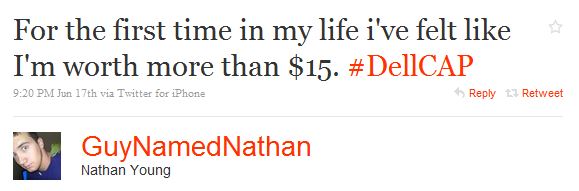
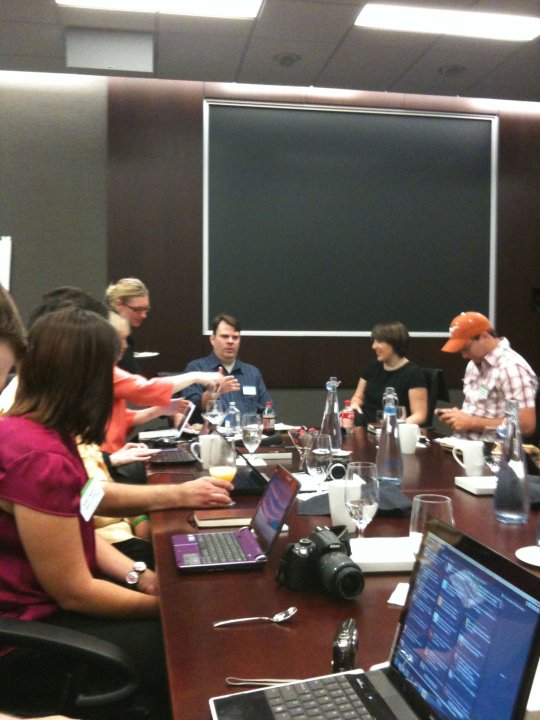
Yet Dell has been using social media to communicate with its customers for at least 4 years now.  That effort took a very brave step forward last week, when Dell hosted its first CAP Days.  CAP stands for Customer Advisory Panel, and you can get more background on the event here, which was spread out over 2 days, involving Dell interacting directly with 30 of its most passionate customers.  I was hired by Dell to help them plan the event, and moderate it both days.  I wanted to share some of what I learned from being involved in the project.

Prior to the event, Dell sent out surveys to all 30 participants to try to get a better feel for what issues were most important to them.  These results would then play a large role in determining the structure of the topics to be covered for both days.  On the first day, Dell met with 15 customers that had had a negative experience with Dell’s products or service (or both), and had used social media to voice their displeasure.  Since customer service had been a problem area for several of the participants, it dominated discussion during the day.  At first, many of the participants were able to share their negative experiences, or ‘vent’ about what had happened to them.  Then later in the day, the discussion turned toward companies that provided exceptional customer service, and ideas were given for how Dell could improve their own efforts.

I noticed two things that surprised me a bit, from both the customers, and Dell employees, during the first day of CAP.

Several times I heard the customers explain that even though they had been involved in a negative experience with Dell, that they wanted to see Dell succeed, and they were happy to be involved with #DellCAP.  One participant even asked me at one point ‘So did Dell think we were going to be the antagonists?’  I’m not sure Dell knew what to expect, but I think they were thrilled with the honest and helpful information they got from the participants.

And on the Dell side, I was surprised a bit that there was very little ‘PR speak’ (almost none, actually), and that the employees present at each session, were honestly listening and processing what the customers were telling them.  I lost count how many times I heard a Dell employee say “Ok so based on what you’ve told us so far, what if we tried to do this? Would that work for you?”  It showed the customers that Dell was listening, and taking their problems seriously.

The second day featured 15 or so Dell evangelists, and 3 hours of the most enjoyable conversations I have ever had in the last 5 years of being involved in social media.  Picture this: I got to lead a discussion on branding, marketing, customer evangelism, and social media with Dell’s Chief Marketing Officer Erin Nelson, Michelle Brigman; Senior Manager of Customer Experience for Dell, social media geniuses like Liz Strauss, Susan Beebe and Connie Bensen, and a dozen or so Dell evangelists.  It was an amazing experience, and possibly the highlight of the week for me.

Also, the morning sessions perfectly illustrated the value that such an event can hold for companies.  A portion of the morning session on Day Two focused on customer service (This had been a VERY hot topic during Day One’s chats as well).  The general sentiment being expressed by the #dellCAP participants was that they loved Dell’s products, but the customer service, especially when it was outsourced to another country, was letting them down.  Dell’s participants explained that the company purposely outsourced a good deal of customer support overseas for consumer products, in order to keep the price of the laptops and desktops lower.  Dell seemed to be telling the participants that this was a conscious choice because they believed that most customers weren’t willing to pay higher prices just to get better service.

But the participants mostly agreed that they WOULD be willing to pay more for a desktop or laptop, if they knew they would receive exceptional customer service if they had a problem with it.  This seemed to be a marketing disconnect for Dell, and the feedback from #DellCAP participants was no doubt invaluable to the company.

And in the end, I think the true value for Dell came from them getting a chance to interact directly with their customers.  Honestly, I was a bit worried that Dell might be using this as a one-off event to simply ‘build some buzz’ online.  But I noticed as soon as the sessions started on the first day that Dell’s participants were listening, and then probing the #DellCAP participants with follow-up questions, based on the feedback they were getting from them.  And of course, when Dell’s CMO Erin Nelson kicked off the second day, that removed any doubts as to whether or not the C-Suite was taking this initiative seriously.

I’ve always said that perhaps the smartest thing a big company can do is connect directly with its most passionate online customers, and Dell did exactly that with #DellCAP.  I was beyond excited to be a part of it, and cannot wait to see what the next steps are.

BTW, this event has generated a ton of feedback on blogs, etc.  I wanted to close by listing some of these posts and videos, so you can see for yourself what everyone thought.  And if you were at #DellCAP, what did you think?  What did you like, what did you dislike?  What would you like to see Dell do moving forward?

Dave’s review of #DellCAP Day One for Fast Company

Allen’s review of #DellCAP Day One

Lauren’s video review of #DellCAP Day One

Vance Morton’s review of #DellCAP on Direct2Dell

Sarah’s #DellCAP Day Two review

Liz Strauss’ #DellCAP Day Two review

Susan’s #DellCAP Day Two review

Dell’s Flickr sets of #DellCap Day One, and Day Two

BTW, each #DellCAP session was ‘visually recorded’ by the fantabulous Sunni Brown.  Dell will be sending us digital copies of the work she created during #DellCAP, but this shot from Susan gives you an idea of her work

Share this:

  • Share on X (Opens in new window) X
  • Share on Facebook (Opens in new window) Facebook
  • Share on LinkedIn (Opens in new window) LinkedIn
  • Email a link to a friend (Opens in new window) Email
  • Share on Reddit (Opens in new window) Reddit

Like this:

Like Loading...

Filed Under: Blogging, Social Media, Social Media 201, Twitter, Uncategorized

June 10, 2010 by Mack Collier

Does your company need a social media evangelist? Why not hire a customer?

That’s exactly what Bruce’s Yams did.  If you follow @MissDestructo on Twitter, you know she is kinda crazy about Bruce’s Yams (in much the same way I am kinda crazy about Dr Pepper, so I don’t judge).  Well her friends on Twitter noticed this, and thought she would be the perfect candidate to work for the company!  So much so that they started a campaign to get Bruce’s attention and hire the gal!

And it worked. Amber (@MissDestructo’s secret identity) was contacted by Bruce’s Yams about handling their social media presences, and before you know it, Bruce’s Yams was on Twitter, managed by @MissDestructo.  Amber created a video explaining how this all came about:

My Bruce’s Yams Social Media Story. from Miss Destructo on Vimeo.

After watching the video and checking out the Bruce’s account on Twitter, I noticed something very important.  Amber is speaking as a ‘real-person’, and a fan of Bruce’s Yams first, and a marketer second.  This is big, because so many companies turn their social media efforts over to employees that are marketers trying to sound like real people.  Amber’s approach is much more personable, and as such, it makes her much more effective in actually connecting with customers.  Thanks to hiring Amber, Bruces is now speaking in a voice that’s much easier for the average customer to hear, and connect with.  Because it sounds like their voice, not the voice of a marketer trying to use Twitter to push links to press releases from the company’s website.  We respond better to messages that are spoken in a voice we can relate to, and understand.

So if your company is looking to create social media presences on certain sites or using certain social media tools, doesn’t reaching out to an existing evangelist that’s already an expert in using that tool, make a lotta sense?  Personally, I think it’s much easier to take an existing customer evangelist that’s an expert on Twitter, and teach them the business side, than it is to take an existing employee, and teach them how to use Twitter (for example) as an effective communication tool.

PS: If Bruce’s Yams had turned its Twitter presence over to an internal employee, and the company had created a video to promote its Twitter account, think it would have looked like Amber’s?

Share this:

  • Share on X (Opens in new window) X
  • Share on Facebook (Opens in new window) Facebook
  • Share on LinkedIn (Opens in new window) LinkedIn
  • Email a link to a friend (Opens in new window) Email
  • Share on Reddit (Opens in new window) Reddit

Like this:

Like Loading...

Filed Under: Social Media, Twitter

June 9, 2010 by Mack Collier

Are you tracking your blog’s stats in real-time?

A fair number of you probably use Google Analytics for your blog’s stats.  GA is great for tracking information about your blog, and the trends that emerge from users interacting with your content.

But GA doesn’t give you real-time information on your blog.  For example, let’s say your blog averages 10 visitors an hour.  But let’s also assume that in the first 15 minutes of this hour, it’s suddenly gotten 237 visitors.

Obviously, something has happened to trigger that huge spike in traffic.  But if you are only using Google Analytics to track your blog’s stats, it will at best be a few hours before you can find out what is happening NOW to trigger a traffic spike.

This is where you really need a way to track your blog’s statistics in real-time.  There are several sites that will track your blog’s stats in real-time, for free.  I use Site Meter, and it installs almost exactly like Google Analytics does, you simply sign up for a free account, and add a small bit of code to your blog’s template, and you are done.

But the BIG reason why I love Site Meter, because it shows me what sites/sources are SENDING traffic to my site.  Here’s an example:

That’s a screenshot of the last 20 visitors here.  Now I’m not getting as much traffic so far today (mainly because I haven’t posted since Monday), but I can quickly see that those circled visitors all came from the same source.  That source ended up being a link that a Twitter user shared with his followers:

Notice that Tom linked to my post here, but didn’t mention me in the tweet.  So unless I was actively checking my referral traffic via SiteMeter, I would have probably never caught this.  And what’s worse, I checked Tom’s Twitter profile and found out he was following me and I was NOT following him!  So I quickly remedied that, and left this tweet:

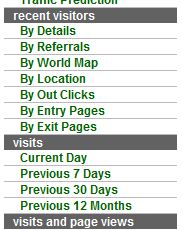
So this is a quick example of the importance of checking your referral traffic via SiteMeter.  Here are some of the options I use the most:


Those options can give you a ton of real-time information about your visitors.  For example, if you just wrote a post about Kodak’s social media efforts, you can click on Details and it will show you if any of your recent visitors are coming from Kodak.com.  Or if you are attending an event in Tulsa, Oklahoma, you can use Location to see how many people from Tulsa are checking out your site.  Or Outclicks is a good one to see how visitors left your site.  If you just wrote a post asking visitors to subscribe, and you see most of the recent visitors are leaving via the link to subscribe via Feedburner, that’s a good thing!

So while I think Google Analytics is invaluable in tracking your blog’s statistics, for real-time information, I use SiteMeter.  Now you don’t have to use SiteMeter, there are other similar free services such as StatCounter, that more or less give you the same information.

Any other fans of SiteMeter?  Or StatCounter?  What do you use to get real-time information on your blog’s visitors?

Share this:

  • Share on X (Opens in new window) X
  • Share on Facebook (Opens in new window) Facebook
  • Share on LinkedIn (Opens in new window) LinkedIn
  • Email a link to a friend (Opens in new window) Email
  • Share on Reddit (Opens in new window) Reddit

Like this:

Like Loading...

Filed Under: Blogging, Social Media 101, Social Media Monitoring, Uncategorized

June 7, 2010 by Mack Collier

The one simple change that boosted my email subscribers by 650%

The prime real estate on your blog is the area called ‘above the fold’.  This is the area of the blog you see when you arrive there.  If you have to scroll down your blog to find something, it is considered ‘below the fold’.

As a result, you want to think carefully about the content that’s ‘above the fold’ on your blog, because there’s no guarantee that a visitor will scroll down your blog.  And simply put, content that’s above the fold is more likely to be viewed/clicked on than if it is below the fold.

To illustrate this point, I recently moved the area for my email subscriptions, and feed subscriptions via RSS.  Up until May 15th, the ‘Mack Live’ section was at the top of the 1st sidebar, with the ‘Subscribe by Email’ graphic just underneath that, so that a visitor would actually have to scroll down to fill out the form.  The area to subscribe via RSS was under it, completely below the fold.

So on May 16th, I decided to move both the email and RSS feed subscription areas to the TOP of the blog, or above the fold.  Here’s the results:

In the 22 days since moving the email subscription form to the top of the blog, I’ve gained 45 email subscribers.  To put that into perspective, it took me 150 days, from December 17th 2009, to May 15th 2010, to gain 45 email subscribers when the form was BELOW the fold.  And for the 22 days prior to the move, I added a mere 6 email subscribers, thus the 650% increase in email subscribers by moving the email subscription form above the fold.  Now I did start asking for readers to subscribe via email during my Twitter experiment for about a week in the posts, but that started on the 17th of last month.  I moved the email subscriber box up on the 16th, and picked up 3 new email subscribers that day, where I had picked up only 4 in the previous 15 days.

As for new subscribers via RSS, according to Feedburner, that’s increased by roughly 20% since the 16th.  And email subscribers are factored into that growth.

This again, shows the value of tinkering with your blog, or ABT – Always Be Testing.  And it shows that you need to consider the layout of your blog, where you put your calls to action, and the type of calls to action they are.  For example, at the top of the far right sidebar, I have an area where you can click to get a quote on consulting services.  I almost never get any clicks here, even though the email subscription form to its left is clicked often.  These are obviously very different calls to action, but in about a week I am going to swap the two, and the track the differences I see in both.  In theory, I would think the far right sidebar would be a better place to have the ‘Get a Quote’ section, since it’s how your eye tracks before it leaves a page, but I don’t know for sure.  So I’ll test it.

You should too.  Look at your blog, especially if it’s a business blog, and notice where your calls to action are.  I am constantly hearing from bloggers that they want more subscribers, and in most cases, they either don’t have a way for readers to subscribe to their feed, or if they do, it’s buried below the fold.  Here’s a quick and dirty way to improve your blog’s performance based on the position of your calls to action:

1 – Identify the key metrics you are tracking to determine your blog’s success.  It could be subscribers, or comments, or sales generated.

2 – Identify the calls to action associated with the metrics you track.  And this might be a good time to get some, if you don’t have any.

3 – Note the location of those calls to action on your blog.  If they are below the fold, that means a lot of people probably aren’t seeing them at all, and they should be above the fold.

But above all else, TINKER with your blog.  This is how you learn, by breaking stuff.

Share this:

  • Share on X (Opens in new window) X
  • Share on Facebook (Opens in new window) Facebook
  • Share on LinkedIn (Opens in new window) LinkedIn
  • Email a link to a friend (Opens in new window) Email
  • Share on Reddit (Opens in new window) Reddit

Like this:

Like Loading...

Filed Under: Blogging, Social Media, Social Media 101

  • « Previous Page
  • 1
  • …
  • 110
  • 111
  • 112
  • 113
  • 114
  • …
  • 119
  • Next Page »

Recent Posts

  • My Substack Conversion Rate Went From 0.5% to 13% in Six Months, Here’s How
  • A Solid Conversion Strategy is Vital on Substack, Here’s the Proof
  • Empathy is Your Customer Service Secret Weapon
  • Understanding Substack’s Three Growth Stages
  • Blogging Isn’t Dead, it’s Morphed Into Substack

Categories

Archives

Comment Policy

Be nice, be considerate, be friendly. Any comment that I feel doesn't meet these simple rules can and probably will be deleted.

Top Posts & Pages

  • Why Did Jesus Send His Apostles Out With Nothing?
  • I Do Not Deserve to Suffer Like This...
  • Let's Take a Closer Look at Patagonia's Worn Wear Road Tour
  • Understanding Substack's Three Growth Stages
  • The Difference Between a Brand Ambassador and a Brand 'Spokesperson'
  • 10 Things You Can Do TODAY to Make Your Blog Better
  • Case Study: Patagonia’s Brand Ambassador Program Focuses on Product Design and Development Over Sales
  • How Much Money Will You Make From Writing a Book?
  • Should Your Business Be On Google Plus? Here's the Quick and Easy Way to Decide
  • Five Tips For Sharing Content Like a Pro on Twitter

  • Blog
  • Mack’s Bio
  • Work With Mack
  • Buy Think Like a Rock Star
  • Book Mack to Speak

Copyright © 2026 · Executive Pro Theme on Genesis Framework · WordPress · Log in

%d