MackCollier.com

  • Blog
  • Mack’s Bio
  • Work With Mack
    • See Mack’s Work
  • Buy Think Like a Rock Star
  • Book Mack to Speak

February 27, 2012 by Mack Collier

Brad Keselowski Capitalizes on Daytona 500 Delay, Tide Whiffs Badly

Brad Kesolowski, Twitter, Daytona 500, Fire, Tide

Pretty interesting turn of events happened earlier tonight at the Daytona 500.  With 40 laps left, the race went under caution, and as usually happens, trucks were on the track to help clear off the debris.

What happened next was totally bizarre.  Driver Juan Pablo Montoya was going down the backstretch when suddenly something ‘broke’ and he lost control of his car, sending it flying into one of the trucks on track to clean it.  A massive fire was the result, as 200 gallons of jet fuel ignited from the crash.

The mess took over an hour to clean up.  Luckily, driver Brad Keselowski had his phone with him, and avidly tweeted during the break, including the above photo, which is the first ever from a NASCAR driver from within his vehicle.  Fox said that @Keselowski picked up over 55,000 Twitter followers during the break, and Fox showed him constantly tweeting and the other drivers mentioned it as well.

But while Brad was smart enough to capitalize on the break, Tide literally had the chance of a lifetime fall into their laps, and they missed catching it.

During the process of putting out the massive fire, a ton of material was dumped on the track, creating a huge mess.  So how did NASCAR clean up that mess?  By bringing out box after box of good ole fashioned Tide detergent.  That’s right, Tide got the best product placement in a sporting event since we saw the Nike logo on Tiger Wood’s golf ball just as the ball fell into the cup at the Masters a few years ago.

Unfortunately, @Tide’s Twitter account left it’s last tweet 7 hours prior to its Daytona 500 appearance, and missed a great chance to capitalize on a ton of free exposure that fell in its lap.

Lesson for brands:  Social Media monitoring is NOT a 9-5 job.  As I said on Twitter, most non-NASCAR fans won’t have any idea what happened tonight, but Tide still missed a great chance to leverage the free exposure NASCAR and Fox gave it.

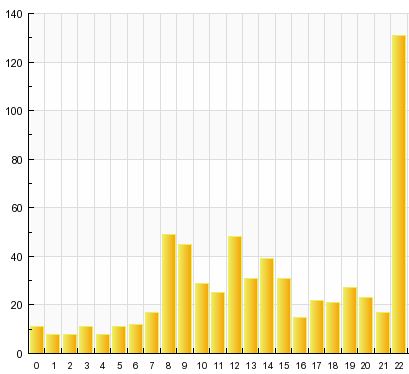
UPDATE: For bloggers, this is also a good lesson in the value of reporting breaking news.  I gained about 120 visitors in 30 mins after publishing this post.  Here’s today’s hourly traffic, note the surge at the end of this picture:
Tide, Brad Keselowski, NASCAR, Daytona 500, Twitter

Share this:

  • Share on X (Opens in new window) X
  • Share on Facebook (Opens in new window) Facebook
  • Share on LinkedIn (Opens in new window) LinkedIn
  • Email a link to a friend (Opens in new window) Email
  • Share on Reddit (Opens in new window) Reddit

Like this:

Like Loading...

Filed Under: Uncategorized

February 27, 2012 by Mack Collier

How I Leveraged Twitter to Boost My Blog’s Traffic by 41% Last Week

I’ve blogged before about how you can use Twitter as a tool to drive more attention and exposure to your blog.  I wanted to walk you through how I used Twitter to increase my blog’s traffic last week by 41% over the previous week.

First, I posted 5 times last week, Sunday-Thursday.  On Monday-Thurs, I had a very specific pattern for using Twitter to push traffic back here.

Starting at 8am each morning, I tweeted a link to the previous day’s post here.  Then I went through Google Reader and every 10 mins from 8:10-8:50 I linked to an interesting post or article.  Then at 9:00 am I linked to my new post for that day.  Then starting at 9:10 am I tweeted out a link to another post or article from someone else every 10 mins.  Usually, I stopped at 10 am.

So from 8am-10am, I tweeted a new post or article, every 10 mins.  2 of them were my posts, the rest were posts or articles other people had written.  Then I would again tweet out a link to that day’s post at noon, and again at 3pm.  Also during the day I would RT any interesting links I saw other people sharing.

Here’s what my traffic looked like 2 weeks ago, then last week:

Two weeks ago, I averaged 340 visitors a day here, last week I averaged 479.

Now this strategy works especially well for companies or individuals that are using a blog as a thought leadership tool or to build awareness.  By sharing relevant content on Twitter that’s consistent with the content I create here, there’s several benefits for me:

1 – Sharing valuable content on the same topics as I blog about helps raise my visibility around those topics.

2 – As I am sharing links, more people start paying attention to the links I am sharing, which means more traffic when I share links back here.

3 – As I share links from other bloggers, it increases the chance that they will reciprocate by RTing a link to one of my posts.


Now on Friday, I didn’t write a new blog post.  Instead, I RTed a link to the 3 most viewed posts here last week, sending out a tweet to a new post at 9am, noon, and 3pm.  This way, I didn’t have to write a new blog post on either Thurs or Friday, so it freed me up to spend that time working on other projects.

So again, here’s the system I used on Monday-Thursday:

1 – Each day, publish a new post at 8am.

2 – Starting at 8am each day, tweet out a link to a new blog post or article every 10 mins till 10am.  13 links total.

3 – Tweet out the link to the previous day’s post at 8am, the current day’s post at 9am.

4 – Tweet out another link to the current day’s post at noon and again at 3pm.

5 – Throughout the day, RT valuable links that I see others sharing.


So if you are looking for a simple way to use Twitter to drive more traffic to your blog and build visibility for yourself, try this simple format.  This is also a good way to take an activity you are already engaging in (reading your feeds in Google Reader) and use that content to build your blog’s traffic as well as your Twitter following.


PS: A few minutes ago I got an email offering to ‘sell’ me 10,000 Twitter followers for $5.  As with much in life, real results require real work.

Share this:

  • Share on X (Opens in new window) X
  • Share on Facebook (Opens in new window) Facebook
  • Share on LinkedIn (Opens in new window) LinkedIn
  • Email a link to a friend (Opens in new window) Email
  • Share on Reddit (Opens in new window) Reddit

Like this:

Like Loading...

Filed Under: Blog Analytics, Blogging, Twitter

February 26, 2012 by Mack Collier

Where Have All The Great Thought Leadership Blogs Gone?

I had an interesting back and forth with Adam the other day on Twitter about his perception that ‘social media gurus’ don’t openly disagree or challenge each other’s thoughts.  I wanted to write a post about that, but then I realized that our discussion actually dovetailed a bit into another train of thought I’ve been having lately; Where have all the great thought leadership blogs gone?

2005 and 2006 was a magical time for me.  Not only was I discovering blogging for the first time, but I was also discovering some amazing bloggers and some profoundly provocative writing on the future of marketing.  Blogs like Horse Pig Cow, Gaping Void, Church of the Customer and Creating Passionate Users inspired me on a daily basis and their thoughts got my creative juices flowing and led to some/most of my best writing.

But around 2007 or 2008, the social media/marketing blogging space began to change.  We went from discussions largely around ‘What If…’ to ‘What Is’ when it came to social media and its impact on marketing.  At the time, this change was welcomed, I remember talk around 2007 or so that we ‘needed to stop talking theory, and start sharing real-world results if we want businesses to take social media seriously’.  By 2007 and 2008, a few innovative companies were starting to produce real case studies from their early social media efforts, and almost overnight, it seems as if we all stopped talking theory, and started embracing reality.

Which is good, to a degree.  It’s wonderful that we started incorporating ‘real world’ business examples into our writings.  But in the process, I think we went too far away from what made our writings so incredibly compelling to begin with.

We stopped asking ‘What If…’

The discussion around ‘Social Business’ has been nagging at me for a while now.  Last week, someone ( I wish I could remember where I saw it) said ‘What everyone is calling ‘Social Business’ seems to just be ‘Good Business’.  Exactly.  This was what was irritating me.  There’s nothing revolutionary or ‘bleeding edge’ about ‘Social Business’.  We just took the idea of running a ‘Good’ business and swapped in the ‘Social’ modifier, and it’s as if we slapped it in a Shiny Object wrapper.

Is it vitally important that companies facilitate collaboration between their employees?  That they find ways to better connect with their customers and they with the company?  That they have tighter connections and smarter conversations with their partners/vendors?

Yes, of course, and you betcha.  But all of those things were just as important in 1912 as they are in 2012.

Back to Adam’s point, somewhere along the line, I think we stopped publicly challenging and disagreeing with each other as much as we should.  Disagreeing with someone isn’t a bad thing (unless you are being disagreeable, there’s a BIG difference), and it encourages thought to have your ideas challenged.

I think we aren’t challenging and building on each other’s ideas like we once did.  As a result, I think the entire Social Media/Marketing blogosphere/whatever has become largely stagnant.  We haven’t run out of new ideas because there’s nothing new to talk about, we’ve run out of new ideas because we aren’t pushing each other to FIND those new ideas.

In 2005 and 2006 we had The Porous Membrane to explain why Corporate Blogging worked, we had Pinko Marketing to explain how customers were more empowered than ever and Influence Ripples to explain how ideas spread and bloggers become influential online.

Today we have ‘Why Your Business Should be a Social Business’, ‘How Pinterest is Killing (Insert SM site here)’, and ‘Klout Sucks’.

Seriously?

We need to do better.  Starting today, I promise to start asking ‘What If…’ here more often.  Sure, I may sometimes make a fool out of myself in the process (Because that doesn’t happen already ;)), but I think asking the occasional question is better than acting like you have all the answers.

Share this:

  • Share on X (Opens in new window) X
  • Share on Facebook (Opens in new window) Facebook
  • Share on LinkedIn (Opens in new window) LinkedIn
  • Email a link to a friend (Opens in new window) Email
  • Share on Reddit (Opens in new window) Reddit

Like this:

Like Loading...

Filed Under: Uncategorized

February 23, 2012 by Mack Collier

The Five-Year Engagement’s Blog Proves That Trying to Be Really Real Can Be Really Hard

Blogging, entertainment, Five Year Engagement, movie marketing

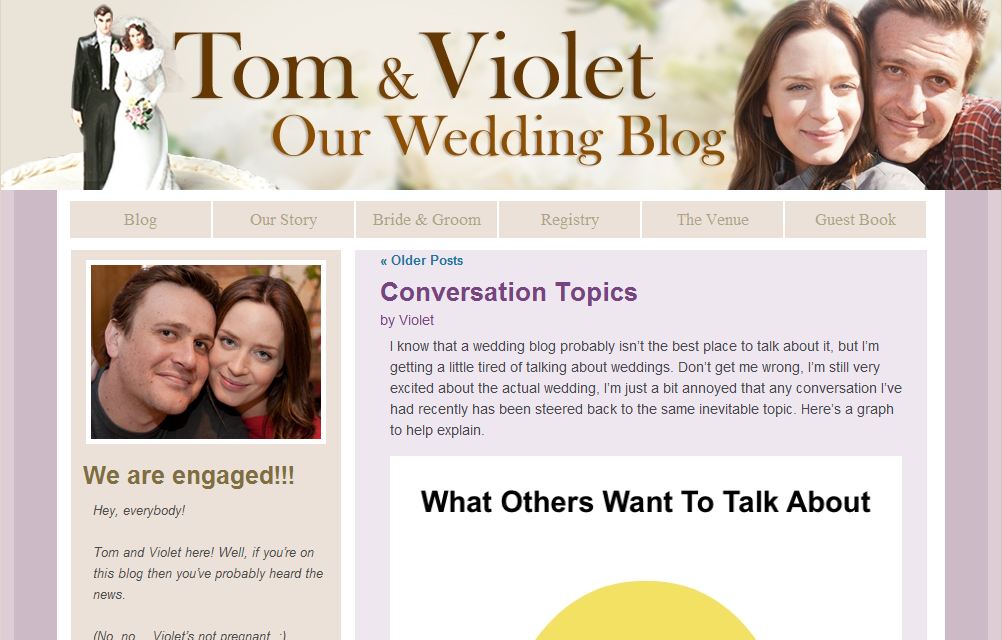
I found an interesting bit of movie marketing news yesterday on Emily’s blog.  She mentioned that the social media strategy for the April release The Five-Year Engagement includes a character blog!  I’ve blogged about this for literally five years, but I think character blogs can be an amazingly smart vehicle for movies and television shows.  Done right, it can be a completely immersive (did I just make up another word?) experience that extends the movie/show’s plot, and rewards its fans with a much deeper level of connection and engagement with the central characters.  Seriously, it’s low-hanging fruit that too many media companies completely miss.

So when I saw Tom and Violet’s Our Wedding Blog, I was pretty excited.  The blog is set up as a way for the movie’s two main characters to announce and walk their friends and family through their engagement and upcoming wedding.  The blog has a ton of posts up, written by both Tom and Violet, and so far there’s even a video Tom has created.

Here’s the problem:  You can’t comment on the blog posts.  If you try, you’re greeted with a ‘ Comments are closed! Please sign our Guest Book!‘  explanation.  What’s worse, the characters in the movie leave cutesy comments back and forth to each other in every post, but fans of the movie aren’t allowed to.

It just breaks your heart.  By not allowing fans to comment on the posts, all Universal has accomplished is to lessen the amount of content that fans would create around this movie.  Yes, opening up comments to the masses is going to create a LOT of extra work for the studio.  They can expect to spend hours pouring through comments and moderating them.

But what happens when Leslie, who can’t wait to see this movie, leaves a comment on the blog telling Tom and Violet that she can’t wait  for the wedding…and then sees it on the blog?  Think that might get her excited?  Think that might GREATLY increase the chance that she’ll blog about the movie, tweet about the movie, and mention it on Facebook?

And what if ‘Tom’ or ‘Violet’ actually RESPONDED to her?!?

Universal has in its hands a great opportunity to engage fans of this movie, and give them a reason to create content that will help the studio by increasing exposure and generating ticket sales.  But they either can’t see the potential of letting ‘regular folk’ comment on the blog, or they do see the potential, and don’t think it’s worth devoting a few hours a week to moderating comments.

So close…

Share this:

  • Share on X (Opens in new window) X
  • Share on Facebook (Opens in new window) Facebook
  • Share on LinkedIn (Opens in new window) LinkedIn
  • Email a link to a friend (Opens in new window) Email
  • Share on Reddit (Opens in new window) Reddit

Like this:

Like Loading...

Filed Under: Blogging, Uncategorized

February 22, 2012 by Mack Collier

What the Hell is a ‘Social Business’ and Why Should You Care?

Social Business, Social Media, Brand advocacy, Mack Collier

If you’ve been following the social media marketing space/blogosphere over the last year or so, you’ve probably heard increasing chatter about the concept of ‘Social Business’.

So what IS a Social Business?  Good question, and it seems one that not even the people chattering about it can agree upon.  For example, The Wikipedia definition states “social business is a non-loss, non-dividend company designed to address a social objective within the highly regulated marketplace of today. It is distinct from a non-profit because the business should seek to generate a modest profit but this will be used to expand the company’s reach, improve the product or service or in other ways to subsidise the social mission.”

Ok…but here’s how @Armano describes it “At it’s core, it’s about connecting stakeholders who are critical to the success of your business. And as I’ve stressed before—it’s about executing initiatives leveraging the “3 P’s”—People, Process & Platforms.”  David also has a nifty drawing that helps explain the process at that link.

And here’s Augie Ray’s definition: “A new form of commerce where consumers, empowered by new social technologies and behaviors, bypass traditional channels and acquire more information, goods and services directly from each other.”

Finally, here’s how the Social Business Forum defines a Social Business: “An organization that has put in place the strategies, technologies and processes to systematically engage all the individuals of its ecosystem (employees, customers, partners, suppliers) to maximize the co-created value”


Three things I see from the above and other various definitions I’ve found for the term ‘Social Business’:

1 – We can’t even agree on the definition of the concept.  Which is no biggie, most of us can’t agree on the definition of ‘Social Media’ and it’s been around for 25 years in some form or another.

2 – The name ‘Social Business’ is terrible in that it immediately makes you think ‘Oh I get it, a business that does social media!’  Seriously, we marketers and business types put the ‘social’ modifier on waaaaay too many things.

3 – These definitions (and much of the discussion around the concept) seem to be focused on the companies that ‘get it’ when it comes to…whatever your definition of a ‘social business’ is.  If you’re a business that doesn’t ‘get it’, is talking about how becoming a social business will help you ‘engage with and empower your customers to increase co-created value’ REALLY going to get you excited?  I mean companies have been hearing about the potential of empowering and embracing their customers for at least 5 years now when we all got on a kick about how amazing social media is.  Right?  If that talk didn’t blow their skirts up, changing the name from ‘social media’ to ‘social business’ and trying again probably won’t either.


BTW here’s another interesting tidbit, the Wikipedia definition of the term ‘Enterprise 2.0‘: Enterprise 2.0 is the use of “Web 2.0” technologies within an organization to enable or streamline business processes while enhancing collaboration – connecting people through the use of social-media tools. Enterprise 2.0 aims to help employees, customers and suppliers collaborate, share, and organize information. Andrew McAfee describes Enterprise 2.0 as “the use of emergent social software platforms within companies, or between companies and their partners or customers”.

Ah we marketers do love to mark our territory by slapping labels on everything, don’t we?

But perhaps the biggest problem I have with most of the discussion around the concept of a ‘Social Business’ is that it seemed to be geared toward selling companies on the concept, versus the actual business benefits of integrating/embracing the concept.

Last month when I spoke at Bazaarvoice, I got to spend some time talking to CMO Erin Nelson and I learned more about BV’s offerings and how the companies is helping its clients.  In general, Bazaarvoice is creating products and systems that let clients get more detailed and relevant (read: valuable) product information and feedback, and then helping them ACT on that feedback, both internally and externally, in order to improve existing business processes.

A very simple example:  Erin noted that LL Bean tracked the reviews customers were leaving on their site for a popular sweater, and they noted that customers were asking for it to be produced in the colors green and purple.  So LL Bean started offering the sweater in those colors as well, and sales doubled as a result.  And the great thing about getting and ACTING on customer feedback is that it only encourages your customers to leave MORE feedback, which increases the chance that you can continue to improve existing business functions as a result.

That one small example to me does more to explain the possible reason why a company would want to become more connected  internally and externally because it details a real-world business benefit from doing so.

As a result, I think those of us that are talking about the concept of a ‘Social Business’ need to stop talking about it as if we are selling a concept/product, and start talking about it as if we are selling the BENEFITS of being a Social Business.  Because that’s what you SHOULD be doing, and besides, that’s a far more interesting conversation to be having anyway.

Share this:

  • Share on X (Opens in new window) X
  • Share on Facebook (Opens in new window) Facebook
  • Share on LinkedIn (Opens in new window) LinkedIn
  • Email a link to a friend (Opens in new window) Email
  • Share on Reddit (Opens in new window) Reddit

Like this:

Like Loading...

Filed Under: Brand Advocacy, Uncategorized

February 21, 2012 by Mack Collier

Newsflash: We All Have the Attention Spans of a Gnat, So Blog About That Topic Again!

social media training, mack collier, social media consulting, twitter, blogging, facebook, social media strategyI was listening to an interview that Problogger had on his site (I would link to it but it was his ‘thank you’ for signing up for his newsletter), and he was interviewing a blogger about the success he’s had with his blog.  The blogger said that part of his success was due to a popular ebook he had created that he had achieved monthly sales of up to $30,000!  Impressive, but then the blogger told Darren that roughly 85% of the ebook had come straight from his blog posts.

My mouth literally fell open.  Then Darren remarked that he’d had similar success with an ebook, and that about the same percentage of that ebook’s content had come straight from his blog.

Seriously?!?

But then I thought about it, and it made total sense.  A lot of people would likely pay $9.95 or more for an ebook in order to get the convenience of the information all neatly organized and combined for them in one place. I think too many bloggers have the mindset that once they blog about a topic, it’s ‘off limits’ for them to ever discuss again.

In reality, I think it’s much safer to assume that most people MISS our blog posts.  Or really any content created via social media.  I think social media participation has ‘trained’ us to scan and release.  We give all the content a few seconds to catch our attention, then quickly move on.  When I was creating the recent #Blogchat survey that many of y’all took, I assumed at I could get 250 responses within a couple of days, and eventually get 500 after about a week.  I’d tweet it once, maybe twice a day.

Yeah, not really.  It took 10 days to get 315 responses and that was with me tweeting out begging for responses up to 5 times a day!  At one point within a 90-min period, I tweeted the link and then @MarketingProfs, @ChrisBrogan, @Barefoot_Exec, @JessicaNorthey, @JayBaer and @JasonFalls all RTed the link to the survey, as well.  That’s well over half a million Twitter followers, but do you know how many survey responses I got from that flood?  About 20.  Also, what I noticed every time I tweeted a link to the survey was that I would get about 3-5 responses within 3-5 mins, and then nothing.  This really hit home for me that if something isn’t RIGHT IN FRONT OF US on our social media channels, we miss it.  Plus it also suggests that Twitter isn’t the best medium to drive survey responses, but I digress…

Often I have blogged about topics more than once.  Never once have I had someone tell me ‘Yeah Mack, you blogged about this before, why are you covering it again?’

Now that doesn’t mean that you should simply repost an old post.  But it DOES mean that you should dig into your archives and find your ‘old’ popular topics, and resurrect them.  Remember yesterday when I talked about your blog’s analytics and using Pageviews and Search Keywords to help you discover popular posts?  Do that, find the posts that others are enjoying, and see if you can write a new post or two about those same topics.  Just this afternoon, I went through the Archives for the posts I wrote here back in 2009, and found 10 posts I can update and expand and republish as new posts.  If I can do the same for 2010 and 2011, I’ve suddenly created a new 30 or so posts for myself to publish here!

There’s no reason why you can’t do the same.  Dig in your archives and see if you have any buried blogging treasure in there that you can share again (or really for the first time) with your readers.  It will also lighten your blogging workload, and who knows, you may even find enough good stuff to make your own ebook and get your own $30,000 a month income!

PS:  I’ve written about this topic before as well, and I’ll forgive you if you missed it the first time 🙂

Share this:

  • Share on X (Opens in new window) X
  • Share on Facebook (Opens in new window) Facebook
  • Share on LinkedIn (Opens in new window) LinkedIn
  • Email a link to a friend (Opens in new window) Email
  • Share on Reddit (Opens in new window) Reddit

Like this:

Like Loading...

Filed Under: Blogging, Uncategorized

February 20, 2012 by Mack Collier

The Beginner’s Guide to Blog Analytics

Analytics is an area that a lot of bloggers don’t pay as much attention to as they should.  And while I’m definitely not an expert when it comes to super-advanced analytics-tracking, I did want to give y’all a general overview of getting analytics tracking set up on your blog and some of the main metrics you should be looking at.

First, you’ll need to add a statistics tracker to your blog.  You can get a premium service if you want, but there’s plenty of free options that should be just fine for the average blogger.  On this blog, I use SiteMeter and Google Analytics to track my blog’s statistics.  Both of these services require you adding a snippet of HTML code to your blog’s template in order to ‘register’ the information about your blog’s visitors.  Now at one time, this could be a pain in the ass, especially if you weren’t comfortable editing your blog’s template coding.  Luckily, it’s gotten a lot easier now to do this.

For SiteMeter, you’ll need to first sign up for a free account, and then SiteMeter will give you the code you need to add to your blog’s template.  If you are comfortable doing the coding yourself, all you’ll need to do is take the HTML code SiteMeter gives you, and put it right before your template’s closing </BODY> tag.  If you have no earthly idea what I just said, don’t worry, you can click this link for a tutorial.  Or to make it even easier, you can do what I did, I took the code and created a new text-based widget on my sidebar, and added it there.  Simple as can be.

The second way I track my blog’s analytics is with Google Analytics.  As with SiteMeter, this requires adding a snippet of code to your blog’s template.  You’ll again need to sign up for an account with Google Analytics, and then take the code they provide and add it to your blog’s template.  I used a plugin to do this for this blog, Yoast’s  Google Analytics for WordPress Plugin.  That link will show you some of the additional functionality you can get from using the plugin.  But again, if you are comfortable tweaking your blog’s template, you can probably add the GA code manually without much problem.

There are other services you can use, but these are the two I use here.  Now in general, I use SiteMeter to track real-time visitor information, and I use Google Analytics to look at trends over time.  Even with the new version of Google Analytics and it’s Real-Time dashboard, I still get more detailed information from SiteMeter, especially on individual visitors.

Now I wanted to give y’all an overview of first some of the ‘basic’ metrics you should be looking at, and then I wanted to walk you through some of the metrics that I spend more time looking at.

Traffic.  Everyone loves to look at their traffic.  But besides being an ego-gush, there’s some very valid reasons to pay close attention to your traffic.  First, you want to see how it’s trending over time.  For example, if your traffic was down 33% in January of this year versus January of 2011, it helps to try to figure out why that decrease happened.

Also, looking at your traffic can give you great clues about when you should be publishing new posts.  For example, here’s what the traffic looks like here over the last 30 days according to SiteMeter:

Note the red Xs.  Those are coming on Saturdays.  Also notice, those traffic levels are the low points for each week.  So that alone tells me that if I want my new posts to get maximum exposure, I probably shouldn’t publish them on Saturday!  But as with anything else on your blog, you still should TEST this!  In my case, I have published posts on Saturday, and the traffic level for those posts was below what similar posts have gotten that were published here during the week.  But still, you need to test to verify your assumptions.

And like many of you, I use Twitter as a tool to help promote my blog posts.  I also know from watching my traffic closely that during the week, the hourly traffic is very low here each day till around 8am, when it starts to increase through the middle of the day till around 3pm, when it starts to fall again.  So when I publish a new blog post, I try to run it at 8am.  For example, I am writing this post on Saturday and Sunday, but will publish it at 8am on Monday morning.  Then, I will schedule a few tweets to promote it during the day, starting at 9am.  I schedule the first tweet for an hour later because typically I will have a couple of comments come in from blog subscribers that see the post as soon as it goes live at 8am.

Then, I will tweet a link out to it at 9am, then again at noon, and finally at 3pm or so.  Now I know from tracking the traffic in the past that I will get a bump in traffic from Twitter for each time I share a link to this new post.  I also know from watching my traffic patterns in the past that the tweet at noon will likely send more traffic here than the tweets at 9am or 3pm.  I assume this is because more people are taking lunch and checking Twitter from their desk at work.

BTW, here’s a detailed post on how I used this strategy to increase my traffic here by 300% and email subscribers by 900% in ONE week.

So in general, you should know what your traffic levels are on a monthly, weekly, daily and hourly basis.  That way if there’s a change good or bad, you should be able to spot it immediately, and then you can investigate to figure out what triggered the change.

Search Traffic.  Now along with traffic, I also pay very close attention to Search Traffic.  The reason why is simple: If someone uses search to find my blog, they probably do not know who I am, and they probably are trying to solve a business problem.  I’ll talk about this a bit more below, but by looking at keywords, I can see what people are looking for when they arrive here.  For example, I know that a lot of people arrive here by looking for information on the pricing for social media marketing services.  That’s because since 2010, I’ve been doing an annual recap of How Much Companies Should Expect to Pay for Social Media.  Last year when I realized how much search traffic was being sent to those posts, I went back and added in a link to my Social Media Marketing Rate Sheet.  Since doing that, I’ve gotten several work inquiries that have specifically mentioned a service and price listed on my Rate Sheet, which was buried on here before I added them to those posts.  Just last week, a major organization emailed me wanting to inquire about one of my services and referenced seeing it listed on my Rate Sheet.

Now should you care about Search Traffic?  Well I think the answer is ‘Yes’, but also note that I care more because this blog is a tool I use to grow my business.  But even if your blog is a personal one, search can help you get found by people that share your interests, which means you can make some new friends, if you aren’t interested in attracting new clients.  If you want to increase your search traffic, there’s two ways that I have found that have worked for me: Post more often, and optimize your posts for search engines.  Here’s a beginner’s guide on how to optimize your posts for search engines.

Referral Traffic.  This tells me what sources are sending traffic to my blog.  For example, it could be Twitter or Facebook, or a link that someone has put on their blog.  It can also help you identify sudden increases in traffic.  For example, if you see that within the last 5 minutes you’ve got as much traffic as you usually get in 5 hours, you can click the referral sources of that traffic, and that will usually tell you where that surge of traffic is coming from.  Often, it will be a new link that someone has posted on their blog, or maybe a popular Twitter user just tweeted out a link to one of your posts.

This also really helps you determine where you should be spending your time promoting your blog, on other sites.  For example, if you see that Facebook is sending your blog 1% of its traffic, but Plus is sending it 8%, then that’s probably a good indicator that your posts are more popular when they are shared on Plus.  A good way to test this is to share your new post on different sites at the same time, and tracking the referral traffic.  For example, if you write a new post tomorrow, share a link to it on Plus, Facebook, and Twitter at 11am on each site, and then track how much traffic each link sends back to your blog.  This is a ‘quick n dirty’ way to test how engaged your network is on each of these sites.

Pageviews for top posts.  This is a great way to tell which posts are most popular on your blog.  Here’s a list of the Top 10 most popular pages on this blog via Pageviews, over the last month:

Note that the top four pages on this blog all deal with the price of social media services.  That tells me that people are hungry for that type of information.

Search Keywords people use to find your blog.  This is really important because it not only gives you better insight into what posts are most popular, but also the search keywords are more about what topics people are interested in.  Also, remember that a lot of people ask search engines questions.  Look at this list of the most popular search keywords here over the last month:

Note that the #6 search term is ‘How to Write Your First Blog Post’.  I actually wrote a blog post with that exact post title.  I’ve talked about this before, but when you write your post titles, think about how people would find your post if they Googled it.  We often Google a question we are looking for the answer to.

Now note that the #1 search term for the last month is ‘social media crisis management’.  Also, looking at the picture above the one above, we see that the post I wrote on social media crisis management is the 7th most popular here in the last month.  That suggests to me that ‘social media crisis management’ is a topic that I may want to consider blogging about again soon.

Now paying close attention to your stats can also give you clues about the type and even FORM of content your visitors enjoy.

For example, here’s a screenshot of the 10 most viewed posts here in the last month from my Direct Traffic, which are usually visitors that came here directly from putting in the URL:

Note the two red circles:  The avg time spend on those two posts is 2:13, whereas the other posts are as low as 5 seconds?  Why is the avg time spend on those particular two posts so much higher?  I think part of the reason why is because both of those posts either have a video or audio file in them.  But I can’t be sure because the post inbetween them on Social Media Crisis Management also has a video embedded, and yet people are spending over a minute LESS time on it.

But this is a good example of why it pays to pay close attention to your blog’s statistics, so that you can better understand how visitors are finding, and interacting with your content.  Investing some time now to better understand blog analytics will not only save you time down the road, it will also make you a better blogger!  If you have any additional questions about your blog’s analytics, please leave a comment and I’ll try to help you!

Share this:

  • Share on X (Opens in new window) X
  • Share on Facebook (Opens in new window) Facebook
  • Share on LinkedIn (Opens in new window) LinkedIn
  • Email a link to a friend (Opens in new window) Email
  • Share on Reddit (Opens in new window) Reddit

Like this:

Like Loading...

Filed Under: Blog Analytics, Blogging, Uncategorized

February 18, 2012 by Mack Collier

My 5 Favorite WordPress Plugins

Tomorrow night (Sunday) we’ll be chatting about our favorite blog plugins at #Blogchat.  The discussion will start at 8pm Central, and if you’ve never joined #Blogchat, here’s what it’s all about.

To prep for that discussion, I wanted to share with y’all my five favorite WordPress plugins. These are for the WordPress.org or Self-Hosted blogs.  You can find these by going to the Plugins section of your WordPress dashboard and searching for them.

5 – Comment Luv.  I love this plugin because it rewards commenters.  When you leave a comment, it gives you the option to add a link to a recent blog post you’ve written.  Most bloggers are looking to get more comments and interaction on their blogs, and this plugin does a great job of encouraging your readers to leave more comments.

4 – Akismet.  Gotta have this plugin, as it blocks spam comments and trackbacks.  I just checked and it says it’s blocked over 55,000 spam comments left here since 2009.  Very rarely does a spam comment get through, we’re talking like 5 times a year, maybe.

3 – Sociable.  Lets you customize which sharing options you put for each post.  Now there is a caveat here because you don’t want to give your readers TOO many options, for example I see some bloggers that use this plugin that give readers sharing options for like 30 different sites.  Fewer is better, pick the top 5 or so sites where you want to distribute your content.

2 – Popular Posts.  This plugin displays your most popular posts (based primarily on views), and is a great way to draw exposure to older posts.  More than once it’s given this blog massive traffic spikes when another site picks up one of the posts served up by the plugin.

1 – Comment Redirect.  This plugin lets you redirect first-time commenters to any page you chose.  I send first-time commenters to this page where I thank them for commenting.  Just a way to let commenters know I appreciate them, and I also include some links so they can get more information on the blog and about me.  I get about an email a week from someone that tells me that it was a very nice touch to be thanked for commenting!


So that’s my 5 favorite WordPress plugins.  What are yours?  Please share them in the comments and don’t forget to join us on Sunday at 8pm Central at #Blogchat and we’ll discuss them more then!


UPDATE: Here’s the transcript to tonight’s #Blogchat if you missed it, a ton of great info and suggestions on blog plugins, thanks to everyone that came!

Share this:

  • Share on X (Opens in new window) X
  • Share on Facebook (Opens in new window) Facebook
  • Share on LinkedIn (Opens in new window) LinkedIn
  • Email a link to a friend (Opens in new window) Email
  • Share on Reddit (Opens in new window) Reddit

Like this:

Like Loading...

Filed Under: #Blogchat, Blogging

February 15, 2012 by Mack Collier

How to Make the Most of Your Next Social Media or Marketing Conference Experience

#blogchat, Live #blogchat

Too often, when companies research conferences to decide if they should attend, they only look at the program.  While the program is probably the most important element to any conference, the value of an event extends far past the agenda.  And in order to tap into all the value a conference can offer, you need to realize that you aren’t going to a conference just to learn.  In fact, you need to realize that you’re going to a conference to play three roles:

1 – You are going to learn.

2 – You are going to network.

3 – You are going to create content.

Let’s look at each now:

Attending a conference to learn – This sounds like a no-brainer, of course you are attending a conference to learn, why else would you go?  But the mistake that too many companies make is they send someone to attend the conference, typically an entry or mid-level employee, and tell them to take as much notes as possible.  So that’s exactly what they do, and they don’t learn very much, because instead of paying attention to the speakers, they were too busy taking notes.  So when they get back to the office and the boss asks what she learned at the event, she drops a pile of notes on the boss’ desk, which are then typed up and distributed to the team.  Congrats, you just paid $2,000 for information you could have gotten from reading a few blogs!

When deciding who should attend an event, send the people that would most benefit from learning while there.  Don’t send them so they can store as much information as possible to regurgitate to the team when they get back.  Send them so THEY can learn, and explain to them that the event is for their benefit.  I guarantee you that if they can focus on what they can learn from the conference, they’ll come back to the office with MUCH better information to share with the team, because they will have paid attention and actually LEARNED something.  This is another reason why you send Social Media Managers and CMOs/Brand Managers vs ‘the marketing/social media guy’ you hired last week.

Networking while at a conference – Let’s be honest, many of us HATE to network.  Especially if you’re an introvert like me.  But with proper planning, the networking process can not only be a much smoother experience, it can be very beneficial to your company!

The first thing to do is start researching WHO will be at the event as soon as possible.  Now the event itself probably won’t release a list of attendees, but for bigger events especially, there will typically be attendees interacting on social media sites prior to the event.  Often, these attendees will be using a hashtag in association with the event (if they are on Twitter), which makes them even easier to find.  Some events, like Blog World Expo, even have chats on Twitter in the weeks leading up to their events which is a fabulous way to make connections so that when you arrive at the conference, you already know some people!

Now as I said, I am an introvert, and I absolutely HATE networking.  Seriously, I am really uncomfortable meeting and connecting with strangers.  But when I attended SXSW last year, I had an amazing time and it was mostly due to the networking I did during the few days I was in Austin.  Starting in January, I began seeing who was attending SXSW, and made a list of the people I wanted to connect with.  Then I contacted these people and set up one-on-one meetings with them.  It worked fabulously!  In years past, I would have seen that a person I wanted to connect with would be attending, and just thought ‘oh well I am sure I will bump into them in the hallways, and I can say hi then!’  And then of course if I did see them, I never would introduce myself.  But with this approach, I met them in a one-on-one setting, which was much more comfortable for me as an introvert, and it was a big reason why SXSW was such a success for me last year.

Now on the flipside, Blog World was a networking disaster for me, because I didn’t follow that same plan.  I spent almost all of my time working on making sure that the Live #Blogchat during Blog World was a success (and it was!), that I didn’t focus as much on networking. So I had fewer meetings, and found myself seeing people I wanted to connect with in a crowd, and not feeling comfortable connecting with them.  I know Lisa Petrilli advises these one-on-one meetings for introverts as a great way to network as well.

So with some prior planning, your conference experience can also lead to some valuable networking with potential clients, customers, and partners!

Creating content at a conference – This is where I think many companies totally miss the boat when it comes to attending conferences.  There is SO much value that can be extracted from creating content at an event.  You can take pictures, and then share those pictures with your audiences on your blog and Twitter followers.  You can do recap posts with fellow attendees and especially conference organizers absolutely LOVE!

And a big advantage is, you can do interviews with speakers and attendees.  Let’s say you work for an SEO firm that has a blog.  You’re blogging every day about best SEO practices, but guess what, so is every other SEO firm.  But let’s say you attend a Social Media event and Google’s Matt Cutts is speaking.  If you could snag 5 mins with Matt to interview him about the state of SEO and then post that on your blog, do you think that MIGHT get your firm’s blog some new attention?  Of course it would.  And if you don’t have the ability to do a video interview, get a voice recorder (I use this one from Olympus) and do an audio interview.  But if you have an iPhone, you should be able to do either a video or audio interview.  Tom Martin has been creating amazing video interviews for years with just his iPhone.

Whenever I attend events I am always looking for ways to create additionally content, and if nothing else, I try to always do a recap post, to share what I learned and my impressions of the event.  And let me tell you, these posts are very popular with event organizers, in fact when I arrive an event, they will often connect with me and ask me if I will be doing a recap post 😉

So there’s some ideas to help you get the most out of your next conference experience.  Really, as high as fees and travel costs are these days, you can’t afford to just go to an event and take notes for 8 hours, then leave.  But if you go realizing that you are there to learn, network, and create content, the overall value you get from your next conference can make the price you pay to get there, a bargain.

Share this:

  • Share on X (Opens in new window) X
  • Share on Facebook (Opens in new window) Facebook
  • Share on LinkedIn (Opens in new window) LinkedIn
  • Email a link to a friend (Opens in new window) Email
  • Share on Reddit (Opens in new window) Reddit

Like this:

Like Loading...

Filed Under: Blogging

February 13, 2012 by Mack Collier

#Blogchat Survey Results

Thanks to all 315 of you that took my #Blogchat survey over the last 10 days.  I really do appreciate it, and I apologize for constantly tweeting about it 😉  If nothing else, this proved to me that people on Twitter are scanning everything and quickly moving on. Every time I would tweet a link to the survey asking everyone to take it, I would get a few responses for about 5 mins immediately after, then nothing.  If I didn’t tweet a link out to the survey for 3 hours, the odds are I got zero new responses in those 3 hours.  Just very interesting to me, and it suggests that Twitter might not be the best avenue to get responses to a survey.

As I said in #Blogchat a few weeks ago, I really think surveys are under-utilized by bloggers, as they really can give you insights about your blog’s readership.  Granted, this is a Twitter chat we are talking about, but I wanted to share with you some of the things I learned from this survey, and why the results were so important.

I used Survey Monkey.  They offer a free version that lets you survey I believe up to 100 people, or you can pay $24 for one month, and have unlimited surveys, at up to 1,000 responses each before you have to pay more. Or you can get on an annual plan.

1 – Over 140 of the responses included a mention of some topics they would like to see covered.  This is big because it gives me an idea of what topics y’all want, so I can cover those, and make #Blogchat more interesting and relevant.  For bloggers, this could tell you what topics your readers want you to post about.

2 – I learned how many #Blogchat participants have their own blog, as well as how many of them blog for a company.  This is big, as it tells me how I need to breakdown the ratio of topics devoted to personal vs business blogging.  Also, on the company side, I found out more about the type of business y’all blog for (B2C, B2B, etc).  This helps as well.  Finally, I found out how many of y’all work for a small business, vs mid-sized or large company.  This also helps me tweak the topics we cover.

3 – I learned more about how ‘big’ the #Blogchat community is.  Up till now, I really had no idea how many ‘lurkers’ we had each week.  I know that we generally have 400-500 participants each week, but I was clueless about the number of people that are watching #Blogchat but aren’t participating.  Now I have a much better idea of what that number is, and thusless, how big the overall #Blogchat community is.

4 – I learned more about the gender and ages of the #Blogchat community.  This, along with the information gained on the size of the #Blogchat in #3, is very valuable to potential sponsors.

So those are just a few of the reasons why I did this survey, but really I wanted to learn more about the people that come to #blogchat every week.  When we were talking about our readership makeup a few weeks ago during #blogchat, a few of you asked ‘but how do you know WHO is reading your blog?’  This is one way: You ask them.  Surveys can really benefit your blogging efforts.

Now, onto the results!   And again, these results are from 315 respondents.

64.4% of #Blogchat members are female, 35.6% are male.  This figure is actually consistent with what I see from Likes on #Blogchat’s Facebook page.

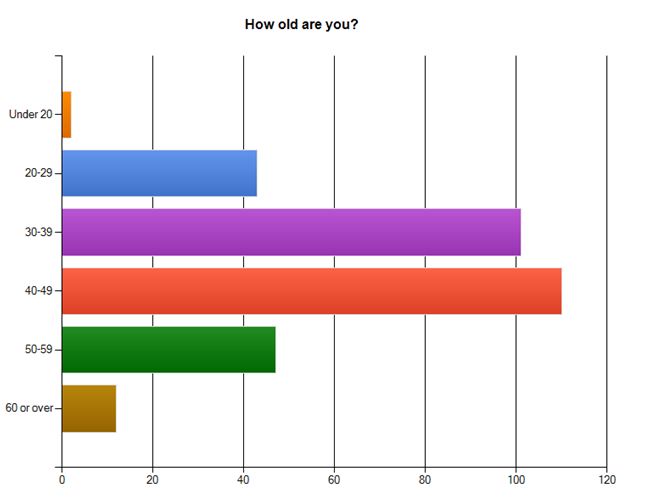
#blogchat, age, survey, twitter

As you can see from the above graph, the 40-49 age group was most common with 34.9%, 30-39 had 32.1%.

52.1% of respondents do blog for their employer.  I was actually surprised that this number was that high, I figured it would be around 25-33%.  Of the respondents that did blog for their employer, 86% do so for an employer with 500 employees or less.  In other words, if you follow #Blogchat and blog for your employer, you likely work for a small business.

As for types of blogging businesses represented in #Blogchat, 61.3% are B2B, 29.4% are B2C.

54.3% of y’all said you prefer to watch and learn versus participate in #blogchat.  This was probably the most interesting result of the entire survey for me, because it gives me my first real sense of the total size of the #blogchat community.  If that percentage holds every week, that means that #blogchat usually averages around 1,000-1,200 active followers/participants per week.

With this question, I was trying to figure out if most of #blogchat were ‘newbie’ bloggers, or more experienced.  65.6% of y’all said you’ve been blogging for at least 2 years.  And 31.6% have been blogging for 4 years or longer.  I was really surprised by that last number, and both suggest that #blogchat is full of experienced and knowledgeable bloggers.  Which is another reason why the chat is so valuable 😉 BTW, 92.1% of y’all said you do have your own blog, even if you also blog for your employer.

Finally, 27% of the #Blogchat community has bought a product or service based on the recommendation of someone in #Blogchat.  That’s a very high percentage, and it again speaks to the sense of community and trust present in #Blogchat!

So again, thank y’all SO much for taking this survey.  I tried to make it as quick and painless as possible, and many of you said it was.

Share this:

  • Share on X (Opens in new window) X
  • Share on Facebook (Opens in new window) Facebook
  • Share on LinkedIn (Opens in new window) LinkedIn
  • Email a link to a friend (Opens in new window) Email
  • Share on Reddit (Opens in new window) Reddit

Like this:

Like Loading...

Filed Under: #Blogchat, Blogging, Twitter

  • « Previous Page
  • 1
  • …
  • 84
  • 85
  • 86
  • 87
  • 88
  • …
  • 119
  • Next Page »

Recent Posts

  • My Substack Conversion Rate Went From 0.5% to 13% in Six Months, Here’s How
  • A Solid Conversion Strategy is Vital on Substack, Here’s the Proof
  • Empathy is Your Customer Service Secret Weapon
  • Understanding Substack’s Three Growth Stages
  • Blogging Isn’t Dead, it’s Morphed Into Substack

Categories

Archives

Comment Policy

Be nice, be considerate, be friendly. Any comment that I feel doesn't meet these simple rules can and probably will be deleted.

Top Posts & Pages

  • Why Did Jesus Send His Apostles Out With Nothing?
  • Understanding Substack's Three Growth Stages
  • Case Study: Patagonia’s Brand Ambassador Program Focuses on Product Design and Development Over Sales
  • Let's Take a Closer Look at Patagonia's Worn Wear Road Tour
  • The Difference Between a Brand Ambassador and a Brand 'Spokesperson'
  • I Do Not Deserve to Suffer Like This...
  • The Real Reason Why the Mona Lisa is So Popular Will Surprise You
  • Case Study: Why GE Started an Employee Brand Ambassador Program to Solve One Specific Business Problem
  • 10 Steps to Creating a Successful Twitter Chat
  • #Blogchat LIVE is coming to Content Marketing World!

  • Blog
  • Mack’s Bio
  • Work With Mack
  • Buy Think Like a Rock Star
  • Book Mack to Speak

Copyright © 2026 · Executive Pro Theme on Genesis Framework · WordPress · Log in

%d