MackCollier.com

  • Blog
  • Mack’s Bio
  • Work With Mack
    • See Mack’s Work
  • Buy Think Like a Rock Star
  • Book Mack to Speak

March 19, 2015 by Mack Collier

Twitter Doesn’t Have a ‘Noise’ Problem, it Has a ‘No One is Talking There Anymore’ Problem

Gary is wrong on this one.  Twitter’s problem isn’t noise, it’s a lack of organic conversations.  The one thing that attracted many of Twitter’s hardcore users from 2006-2008, is now all but dead in 2015.  The beauty of Twitter in those early days was that it was an incredible discovery tool.  You could meet new people seamlessly, and you could expand your network (personal or professional) all at the same time via simply chatting with people on Twitter.  It was a huge chat room open to everyone, 140 characters at a time.

Then in 2008, Twitter decided that it didn’t have the bandwidth or funding to pay for all these ‘silly’ conversations.  So it changed the rules, and said that you couldn’t see a reply a friend left unless you were also following that 3rd person.  This effectively killed any chance we had of organically expanding our networks on Twitter.  Which was one of the key attractions of the site prior to 2008.  This alone caused many of Twitter’s early adopters to either leave the site, or spend far less time there.

Then…came the celebrities.

Ashton Kutcher killed Twitter 

aplusk

It was 2009 and I was looking at a billboard in Alabama telling traffic up and down Woodward Avenue to follow Ashton Kutcher.  I had to pull over and take a picture, because this was a huge deal, right?  Finally that little site I loved was getting mainstream attention!

Which, of course, was the beginning of the end.  Ashton had found Twitter.  Oprah had found Twitter, which meant everyone was about to find Twitter.  The mainstream floodgates opened, and suddenly everyone was joining Twitter.

And the user experience was about to change dramatically.  When the marketers found Twitter, the marketers did what marketers do: They turned Twitter into their new marketing channel.  Another blow to early adopters that had come to Twitter for the conversations, which were increasingly being choked out by self-promotion.

The Rise of the Twitter Chats  

In late 2008, the Twitter chat was born.  And in great part, this was a direct response to the increasing difficulty in creating and cultivating organic conversations.  Prior to 2009, I could go on Twitter almost anytime I wanted and ask a simple question and within 5-10 mins be involved in a deep conversation with a dozen people.  And that was when I had maybe 5,000 followers.  In fact, I started #blogchat simply because 6 years ago I asked a simple question about blogging and in less than an hour, there were over 200 tweets in that conversation, and I wanted to add a hashtag to it so I could keep up with everything said around the topic.

But even the increasingly use of Twitter chats points to the fact that organic conversations have increasingly left Twitter.  So much so that we had to schedule them!  Let’s meet on Twitter every Sunday night at 8pm Central to talk blogging!  Because otherwise, it won’t happen.

User Behavior Has Adapted as the Experience Has Changed

More and more, Twitter has become a content stream where it used to be a conversation stream.  It’s not about interactions and discussions, now it’s about sharing links.  The way I use Twitter has completely changed in the last few years.  I used to use Twitter as a networking tool, I’d go there, say hi to a few friends, and over the course of a couple hours I’d reconnect and catch up with friends, I’d be introduced to some new ones, maybe even grab a work lead or two.

Today, the primary way I use Twitter is as a content stream.  Every day I send out more links to my own content than I would in a month in 2009.  The type of engagement when from conversations to clicks and RTs.  And we all changed our behavior as a result.  At least those of us that stayed did.  The result is that there’s more ‘stuff’ on Twitter and none of it is getting the eyeballs or engagement that it once did.

I’d Like to Order a Tweet, and Can You Upsize My Engagement? 

Back to the issue of falling engagement for a minute.  I currently have about 50,000 followers on Twitter.  When I send a tweet out, obviously not all 50,000 followers will see that tweet.  I get it.  But according to Twitter’s analytics, only about 1-2% of my followers see the majority of my tweets.  That means that less than 1,000 of my 50,000 followers see the average tweet I leave.

That sounds impossibly low, so on a whim I decided to spend $10 promoting one of my Tweets to see if I saw similar engagement numbers.  Here’s what happened:
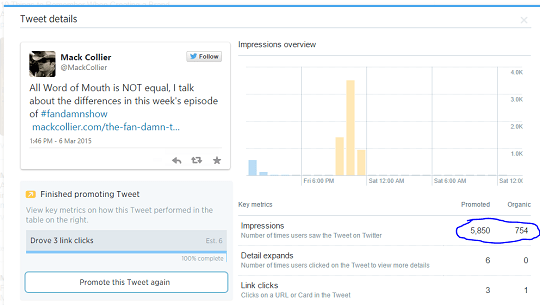
TweetPromotedNumbers are a bit hard to read, but what this means is that organically (free), my tweet reached 754 of my followers.  When I paid Twitter $10, they were able to reach 5,850 of my followers.  Which brings us to the second way to get engagement for your social media content: Pay for it.

Twitter is Dead and it’s Never Coming Back

I joined Twitter exactly 8 years ago.  For the first 18 months I was there, it was truly a magical place because of all the wonderful people I came to know.  But when ‘everyone’ found Twitter, the experience began to change.  And Twitter began to devalue the role of organic conversations on the site.  The core experience that attracted many of us to Twitter in the first place began to erode.  Now that Twitter has gone public, shareholders and Wall-Street will push for more monetization efforts.  Which means the experience that drew me to Twitter in the first place will continue to disappear.

And the irony is I’ll post this on Twitter, and a lot of the people that would agree with me, the people I connected with in those first 18 months will never see this post.  And it won’t be because there’s so much ‘noise’ on Twitter that my post gets lost in the content stream.

It will be because they’ve already left Twitter.

Share this:

  • Share on X (Opens in new window) X
  • Share on Facebook (Opens in new window) Facebook
  • Share on LinkedIn (Opens in new window) LinkedIn
  • Email a link to a friend (Opens in new window) Email
  • Share on Reddit (Opens in new window) Reddit

Like this:

Like Loading...

Filed Under: Twitter

February 19, 2015 by Mack Collier

What You Can Learn From My Record Blog Traffic Yesterday

I am constantly preaching the need for bloggers to have Google Analytics on their blog during #Blogchat.  A big reason why is so you can track changes in your blog, good and bad, so that you can understand why the change happened.

Yesterday this blog had 2,235 visitors, which is about 90 more than the previous high for one day.  What I want to do is walk you through the stats in Google Analytics to figure out why this happened, and also give you some insights into how you can do the same for your posts.

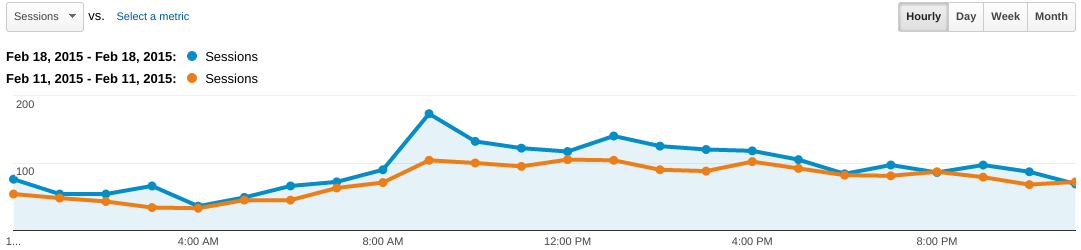
One thing I do every day is a comparison between the current day’s traffic and the traffic from one week ago.  For example, today I’ll track the current day’s traffic (Thursday) and also compare the hourly traffic against last Thursday’s traffic.  This gives me an easy way to see if traffic is doing better or worse than it was a week ago.  Here’s what that comparison looked like for yesterday compared to a week earlier:

HourlyGAtraffic
 That’s a really strong graph as it shows that traffic for yesterday (blue) was higher than the previous Wednesday during every hour yesterday except for the final one of the day.  This is what you want to see, because it indicates that traffic is growing week to week.

But the traffic last Wednesday was 1,785, whereas yesterday it was 2,235.  That’s a 25% increase, and while I’m thrilled with that jump, I want to figure out why it happened.

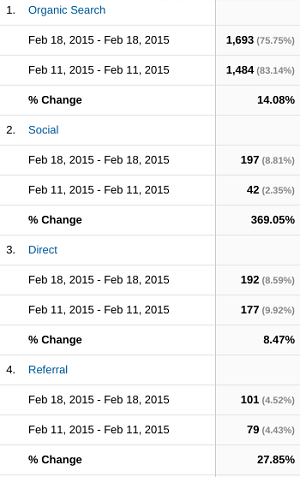
So let’s put on our cyber detective hats and dive deeper into the blog’s stats.  The first place I’ll start is by taking the above data (yesterday’s traffic vs the previous Wednesday’s) and segment that traffic into channels.  You can find this in Google Analytics by clicking Acquisition>All Traffic>Channels:

ChannelTraffic1

Three things immediately jump off this graph to me:

1 – Note that there was a BIG jump in search traffic.

2 – While the number of visitors that arrived at the blog from an organic search increased, the percentage of overall traffic that came from search actually went DOWN.

3 – There was a BIG jump in traffic from Social.


Now, the big jump in search along with the big jump in social is interesting to me.  It increased by 14% week to week, which is much higher than it normally does.  I want to play a hunch and check out the sources of the Social traffic.  So I click on Social and it will show me which social sites drove traffic to my blog yesterday and a week ago yesterday:

SocialTrafficA-ha! So almost all of the surge in Social traffic yesterday vs a week ago was actually coming from just Twitter.  This is my suspicion: As people were sharing my content yesterday on Twitter, it was leading to more links to my content being seeded higher in search results on Google. So the better my content did on Twitter yesterday, it resulted in it also doing better in search results on Google.  That would explain why search traffic spiked because overall the two traffic sources that accounted for almost all of the overall traffic bump yesterday were Google and Twitter.  Perhaps this is a result of Google indexing tweets into search results?

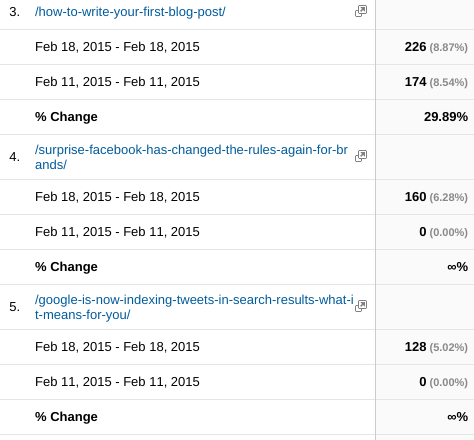
But I still don’t know if any content in particular was driving the increase in traffic.  That’s what I really want to know.  So back to Google Analytics, I click Behavior>Site Content>All Pages:

PostsGA
Double A-Ha! The 4th and 5th most viewed posts yesterday were both new posts I wrote this week.  And a big chunk of the overall growth in traffic can be tied back to these 2 posts (288 new visitors).

This also gives me important insights into the type of content that resonates with my readers.  And since I’ve already looked at the channel data, I know that most of the increase probably came from Twitter, so really I know that these two topics likely resonate with my followers on Twitter.

And the beauty of this is I can come back tomorrow and do the same analysis on this post, and compare how it does today vs how the above two posts from earlier this week did.  BTW, a big reason why I wanted to write this post is because I have been doing these type of analysis for a while now, and I know that posts that do a deep-dive into actual numbers are popular with readers here.  Another advantage to knowing your blog’s stats!

The point in all this is to invest time in understanding your blog’s stats so you can improve your blogging efforts and efficiency.  If I hadn’t looked at my blog’s stats I would have little idea that yesterday was a record-setting traffic day or more importantly why it was a record-setting traffic day.  Now I know, and that knowledge will help me improve my blogging efforts moving forward.  Just as it will for you if in you invest the time in understanding your blog’s stats.

Share this:

  • Share on X (Opens in new window) X
  • Share on Facebook (Opens in new window) Facebook
  • Share on LinkedIn (Opens in new window) LinkedIn
  • Email a link to a friend (Opens in new window) Email
  • Share on Reddit (Opens in new window) Reddit

Like this:

Like Loading...

Filed Under: Blog Analytics, Twitter

February 17, 2015 by Mack Collier

Google is Now Indexing Tweets in Search Results, What it Means For You

Google’s love affair with Twitter is back on.  Previously, Google had indexed tweets from Twitter in its search results, but that deal ended in 2011.  Here’s a post I wrote back in 2011 that examined how this process worked.  Earlier this month it was reported that Google would begin adding tweets back to search results sometime in the first half of 2015, but it looks like it’s already underway.

Here’s a screenshot from a google search I did for the name of my marketing podcast.  Note the 6th and 7th results on the first page are tweets I left:

FanDamnTweetsGoogleThis means that content you create on Twitter (tweets) is now being indexed into search results alongside posts that appear on your blog or white papers on your website.

It also means that you now have another channel to seed your content into Google search results.  One of the issues that many blogging businesses face is a difficulty in getting content to rank high in Google results.  It typically can take years to build a business blog to the point where content ranks well in search results.

But if you have a large following on Twitter, that could mean that your tweets rank higher in search results than blog posts you write on the same topics.  You can leverage your following on Twitter to help build your audience for your blog.

Another way to use Twitter to help your blog (and this has nothing to do with Google indexing tweets) is to leverage your business discussions on Twitter as potential topics for your business blog.  I am constantly doing this, I will use Twitter as sort of a ‘sounding board’ to see which topics are important and interesting to others.  Participating and even lurking in Twitter chats is a great way to do this.  By following a Twitter chat that’s focused on topics that are relevant to your blog, you can get a better sense for which topics interest potential readers of your blog.  Which can lead to more content ideas for your blog, which will make it easier to hit your content creation goals.

Have you noticed that tweets are showing up in Google results?  Has it impacted any search terms your blog has ranked for in the past?


Share this:

  • Share on X (Opens in new window) X
  • Share on Facebook (Opens in new window) Facebook
  • Share on LinkedIn (Opens in new window) LinkedIn
  • Email a link to a friend (Opens in new window) Email
  • Share on Reddit (Opens in new window) Reddit

Like this:

Like Loading...

Filed Under: Fan-Damn-Tastic Marketing Show, Search Engine Optimization, Twitter

February 4, 2015 by Mack Collier

The Fan-Damn-Tastic Marketing Show Episode 14: Segmenting Your Fans to Better Engage Them

Welcome to the 14th episode of #FanDamnShow! Today’s episode is how to stabilize or build your social media engagement by segmenting your fans online to better engage with them. If you enjoy this episode then please subscribe on iTunes!

Show Notes

0:50 How engagement around social media content seems to be falling

3:00 Our behavior has shifted from engaging with content to simply creating and sharing content

3:50 If your engagement is falling, then most engagement will come from the people that know you and have an existing relationship with you

6:00 How to segment your fans and easily stay engaged with them on Twitter and Google Plus

12:45 Results of my January goal for total downloads and whether I hit that number

14:05 The two things I learned from doing #FanDamnShow in January


Here’s where you can download this episode directly.

[smart_track_player url=”http://traffic.libsyn.com/fandamnshow/Episode_14_-_Segmenting_FansFINAL.mp3″ title=”How to Segment Your Fans to Better Connect With Them” ]

[smart_podcast_player]

Share this:

  • Share on X (Opens in new window) X
  • Share on Facebook (Opens in new window) Facebook
  • Share on LinkedIn (Opens in new window) LinkedIn
  • Email a link to a friend (Opens in new window) Email
  • Share on Reddit (Opens in new window) Reddit

Like this:

Like Loading...

Filed Under: Brand Advocacy, Fan-Damn-Tastic Marketing Show, Google+, Social Media, Twitter

January 21, 2015 by Mack Collier

Using Twitter’s Analytics to Create More Engaging Content

So this year I’ve been spending a lot of time analyzing the analytics that Twitter provides me for my tweets.  You can click on that link and find the analytics for your own account.  It shows you the Impressions, Retweets, Favorites, and Link Clicks for your tweets.  It’s also a great tool to help you understand how to create more engaging content.

TwitterEngagementsOne of the many things I like is that Twitter shows your monthly and daily totals for engagements, retweets, favorites, links clicked, etc.  It’s a great way to see how your content does on average, but it also shows you how your content is trending from an engagement perspective.  On the right is a snapshot of some of the information on my account as of this morning.

Another feature that I like is Twitter shows you how many ‘engagements’ each tweet is getting and the type of engagements.  This is very helpful and can teach you a lot about what type of content drives engagement on Twitter.

Here’s a simple example: I went back and checked the tweets I had left this month.  I was looking specifically for tweets where I included a link to a blog post I had written.  Some of these tweets included a picture along with the link, some did not.  I picked an equal number of each, and then figured out the average engagement rate for each.  Here’s what I found:

Average engagement rate for all tweets – 1.2%

Average engagement rate for tweets with a link to a post I had written, without attaching a picture to the tweet – 1.0%.

Average engagement rate for tweets with a link to a post I had written, with a picture attached to the tweet – 1.6%


So that means that for my tweets, attaching a picture results in a 60% boost in engagement!  It also shows that tweets with a picture are 33% more engaging than all tweets.

TweetDetailI love Twitter’s Analytics section because it can be a wonderful teaching tool for you.  So much of content creation is simple trial and error.  You need to repeatedly create content to learn how to become better at creating content.  This can also be applied to sharing content on Twitter.  Experimenting with different ways of sharing content can help you understand how to create more engaging tweets.

Here’s an example:  Lets say you have a new blog post that you want to promote on Twitter.  Here’s 4 ways you could promote that post:

1 – Share the headline and link

2 – Share the headline, a picture, and the link

3 – Share a quote from the post, and the link

4 – Share a quote from the post, a picture, and the link


You could share the link each of those 4 ways, then see which way drove the most engagement.  Keep repeating this experiment with other posts and you may begin to realize the best way that you should craft a tweet in order to increase engagement.

Remember, it’s fine to get advice from ‘experts’, but the best way to learn is to do it yourself.  Start playing with Twitter’s analytics for your account and see what you learn.

Share this:

  • Share on X (Opens in new window) X
  • Share on Facebook (Opens in new window) Facebook
  • Share on LinkedIn (Opens in new window) LinkedIn
  • Email a link to a friend (Opens in new window) Email
  • Share on Reddit (Opens in new window) Reddit

Like this:

Like Loading...

Filed Under: Content Marketing, Social Media, Twitter

August 14, 2014 by Mack Collier

Why Does Twitter Hate That People Want to Have Conversations on Its Site?

If you talk to any long-time Twitter user, one of the first complaints you will hear is ‘I miss when you could actually have a conversation on Twitter’.  Those of you that joined Twitter within say the last 4-5 years wouldn’t know, but Twitter used to be a hotbed for organic conversations.  In fact, that used to be the primary appeal of the site, going to Twitter and meeting new people and having discussions with them.

But several years ago, Twitter made a very small technical change that signaled its true intent.  For the first few years of its existence, when someone you followed replied to someone you didn’t follow, you could see that tweet.  Here’s an example from Veronica, who I am following:

@MazzyStarFan Hey don’t forget that the tweetup is tonight at the Half Pint, on 3rd Ave and 4th St!

Now even though I am not following @MazzyStarFan, in the ‘old days’ of Twitter, I would have seen this tweet.  And in this case, the tweet would have told me there was a tweetup tonight that I didn’t know about, so I might want to attend.

But the change Twitter made was that in order to see this example tweet, I have to be following both Veronica and @MazzyStar (or Veronica has to put a dot in front of her reply to @MazzyStarFan).  Since I’ve never met @MazzyStarFan and have no idea who she is, I can’t follow her, and I miss this tweet and miss the tweetup as well.

This also makes it much harder to organically meet and follow new people on Twitter.  Because if I am having a conversation with Tom, and he starts talking about the same topic with Jennifer, I can only see and comment on Tom’s tweets to Jennifer if I am following Jennifer as well.  Basically if Twitter was a mixer or networking event, you would only be able to interact with the people you already knew.

Why does Twitter do this?  Because Twitter thinks it can do a better job of deciding how you want to use its site, than you can:

 We’re trying to avoid the situation of you hearing someone answer a question when you didn’t hear the question (for instance). Also, you don’t have to hear answers to the question from people you don’t want to hear from. (If you’re not following them, you won’t see their answer.)

That’s great, but why not give me a setting that lets me decide if I want to see replies from people I don’t follow?  Why assume that you know the type of user experience that I want?

And now there are rumors that Twitter wants to eliminate at replies and hashtags.  What the hell is going on here?  Add in that so many blogs are now ditching comments and it seems that there’s an all-out war on conversations on social media sites.  Share content, but don’t discuss the content.

I hate to be an old social media fogey, but give me the good old days (2007-2008) when I could actually have conversations on social media sites with friends versus today when I go, try to wade through a stream of self-promotional tweets, then throw my hands up and leave.  That’s not progress, it’s clutter.

Twitter, stop messing up my Twitter.

Share this:

  • Share on X (Opens in new window) X
  • Share on Facebook (Opens in new window) Facebook
  • Share on LinkedIn (Opens in new window) LinkedIn
  • Email a link to a friend (Opens in new window) Email
  • Share on Reddit (Opens in new window) Reddit

Like this:

Like Loading...

Filed Under: Twitter

January 7, 2014 by Mack Collier

Reaching a More Connected Customer Requires a More Connected Company

Over the Holidays I was reading an issue of the Wall-Street Journal about how companies are leveraging Twitter to improve its marketing.  Companies that sell cold medicines and items, especially those related to treating the flu, are closely monitoring Twitter.  They are tracking instances of people complaining on Twitter about having flu symptoms such as body aches, coughing and colds.  Then they will track where these people live, and make sure that local retailers are have sufficient inventory of any cold treatment products or medicines that the company sells.  Clorox and Kimberly-Clark (makers of Kleenex brand tissues) both reported double-digit sales growth by utilizing Twitter and online chatter to drive shipments of cold products during the previous flu season.

While this type of conversation-mining might seem revolutionary to many companies, it can seem a bit underwhelming to the customers these companies are trying to reach.  This type of functionality has long been available even in basic and free versions.  The now-defunct site Monitter.com provided users location-based searching based on zip code.  Even Twitter now provides this functionality, and you can even factor in user sentiment.

community building, online community

We’ve been chattering on Twitter for several years now.  When companies first arrived their goal was to market and promote.  As the above examples illustrate, now they are beginning to understand the value of listening.  One of the great marketing benefits of social media for companies is word of mouth in digital form.  Before social media and the internet, if customers in Nashville began complaining about flu-like symptoms in December, they did so via analog tools that were largely inaccessible to companies that sold products that could have helped them relieve their flu symptoms.  Today, we are increasingly using digital and social media tools, and as such, our word of mouth is now in digital form so companies can access it and act on it.

But the key is that companies must make the effort to access that customer feedback.  If your company is consistently tracking and analyzing this digital word of mouth from your customers, you will begin to notice trends and patterns.  You will begin to develop a deeper understanding of your customers.

Which means you can market more efficiently to them.  By 2014, most companies that do any business online are at least experimenting with social media.  But few companies are truly utilizing social media efficiently to drive real business growth.

If you want to be in the minority of companies that are using social media marketing correctly, start by leveraging these tools to better understand your customers.  Too many companies start using social media to better sell to customers.  That should come later.  Use this simple format:

1 – Listen first, then take what you learn and apply it to…

2 – Engaging with your customers.  Interact with them, help them, and create value for them.  That leads to…

3 – Sales

Instead, too many companies put the cart before the horse and jump in immediately trying to sell to people they don’t understand via tools they don’t understand.

Don’t put the digital cart before the digital horse.  It’s not about understanding the tools, it’s about understanding how and why your customers are using the tools.  Then you can move forward.


Share this:

  • Share on X (Opens in new window) X
  • Share on Facebook (Opens in new window) Facebook
  • Share on LinkedIn (Opens in new window) LinkedIn
  • Email a link to a friend (Opens in new window) Email
  • Share on Reddit (Opens in new window) Reddit

Like this:

Like Loading...

Filed Under: Social Media, Social Media Monitoring, Twitter

December 4, 2013 by Mack Collier

Your Brand’s Guide to Creating an Amazing Twitter Chat

PanteneChatOver the past 4 years I’ve run a pretty popular Twitter chat, I’ve also worked with sponsors and brands to help them facilitate their own.  Twitter chats can be an amazing way for your brand to connect with customers, if you know what you are getting into.  Here’s how to get started:

1 – Pick a theme for your chat that’s related to your brand but not about your brand.  This is a subtle distinction, but it will make all the difference in the success of your twitter chat.  If you theme of your chat is related to the brand then it will be focused on the customer and their wants and needs.  That’s how you’ll win their attention.  Here’s a few examples:

Nikon – How to take amazing photographs

Southwest Airlines – Managing holiday traveling

Purina – Raising a happy and healthy dog

See how the focus has shifted to the customer?  That’s what you want, ask yourself ‘What need is this chat addressing for the customer, or what problem is it solving for them?’  It will help create a popular and exciting chat which ends up being great promotion for your brand.

2 – Pick the day and time.  Think about who you want to be in the chat and who you are connecting with.  Factor in when they can be available to join a chat, and plan accordingly.  Also, consider what other entertainment options might be available to them that could distract their attention.  For example, if you decide to hold a chat next Thursday night at 8pm, remember that’s primetime for television watching so see if there is a major series or event that will be on opposite your chat that might steal some participants.

3 – Pick your schedule.  Will your chat be regular, or a one-time deal?  Fair warning, unless your brand is pretty big, getting traction from just one chat will be difficult.  If one of the main reasons why you are starting the twitter chat it to raise awareness of your brand, then having a weekly chat is your best bet.  Yes, it will be a lot of work and yes it will likely take a while to gain traction, but most things worth pursuing are a lot of work.

4 – Find Influencers, Experts and Customers that can help you get the word out about your chat.  This really helped me take #Blogchat to the next level.  After about 6 months or so of doing #Blogchat, we’d run through most of the ‘basic’ blogging topics, and needed some fresh topics.  So I started asking blogging experts to come in and co-host on a certain topic that they were the expert on.  They also brought their audience with them, so the reach of #Blogchat expanded greatly, plus it was good exposure for the co-host.  You can do the same thing with your brand’s twitter chat.  Look for customers that are already engaging with your brand (fans are even better) and ask them if they would be willing to join your twitter chat and participate.  Also, if you have the budget, you can bring in experts that will not only help drive the conversation, they will also bring their audience with them.  But it needs to make sense for the chat, for example if you are launching a twitter chat on gardening, Gary Vee might not be your best bet for a co-host.  Sure, he’s a smart guy with a massive following, but you’d rather have someone whose following is interested in gardening, and a person that’s recognized as an expert in that space.

5 – Decide on how the chat will be organized and moderated.  Most chats have a main topic, then ask a series of questions based on that topic.  For example, many chats ask a new question every 10 mins or so.  This is the most common form of organizing a chat.  If you are going to do a weekly chat, ask your participants which method they want.  For #Blogchat, I typically have the main topic then no more than 2 questions.  But #Blogchat is such a large chat that I can do that, for a smaller one it would probably be better to have more questions to better organize the conversation and help facilitate it.

6 – Pick as short of a hashtag as possible for your chat.  Remember that you are working within the restrictions of Twitter’s 140-character limit for tweets.  So every character you use for a hashtag is one that you take away from the tweet you can write.  You want your hashtag to be as short as possible and as memorable as possible.

Let’s take the above example from Purina starting a chat about raising a happy and healthy dog.  Which hashtag makes more sense:

#PurinaLovesHappyAndHealthyDogs

#HappyDogsChat

Yes, I know the good folks at Purina would love to have the Purina name in the chat’s hashtag, but I’m betting participants would much rather have #HappyDogsChat.  Also remember the longer and more complicated you make your hashtag, the greater the chance that people will use the wrong hashtag or misspell it.

7 – Create prep materials for the chat.  (Almost) every week for #blogchat I will write a ‘prep post’ that outlines what we will be talking about during that Sunday night’s #blogchat.  Here’s the one from last Sunday.  That way, participants know what to expect and the chat will flow better.  Plus, an added benefit to me is that it sends traffic back to my blog.  You could also post this on your Facebook page or on Google Plus, but it’s best if you post it on a property you own (blog, website) cause then that traffic comes back to you.

8 – Think about what action you want to drive from participants.  Remember this, if you have created a valuable chat for your customers, then you have earned the right to ask them for something.  Maybe you want them to go to your website and download a white paper, or signup for a free trial of your new service.  Many brands will do giveaways in association with their chat, this is a great way to drive interest and reward participants as well.  But you need to think about how you can move twitter chat participants OFF Twitter and onto a property you own.

9 – Invite and welcome newbies.  As your chat begins you will likely see some people tweeting ‘Hey just found this chat, what is it?’ or similar.  Always always ALWAYS welcome newbies and THANK them for joining.  If they tweet asking what the deal is and are immediately welcomed and thanked for coming, that greatly increases the chances that they will stay and participate.

10 – Ask for feedback, and act on it.  This is especially important if you want to run an ongoing twitter chat.  Ask participants what you can do better.  Ask them what topics they want to see covered.  Yes it can be scary to ask for feedback and hear them tell you what you are doing wrong.  But when you ask for feedback you are doing something very powerful: You are making the participants the owners of the chat.  When Jessica tells you what she wants to see you discuss and then you pick her topic, then that chat is HER chat!  That makes her more invested in the chat, so she’s more likely to participate and promote it to others.  It also sends a signal to all the other participants that you value and appreciate their feedback.

11 – Say ‘Thank You’ and mean it when you say it.  It’s damn hard work to get a twitter chat off the ground.  Even if you only have 3 people show up for your first chat, make sure they understand how much you appreciate them, because that will encourage them to come back. And next time they’ll likely tell their friends to come with them.


If you’ve participated in brand-run twitter chats, what would you add to this list?

Share this:

  • Share on X (Opens in new window) X
  • Share on Facebook (Opens in new window) Facebook
  • Share on LinkedIn (Opens in new window) LinkedIn
  • Email a link to a friend (Opens in new window) Email
  • Share on Reddit (Opens in new window) Reddit

Like this:

Like Loading...

Filed Under: Twitter

November 25, 2013 by Mack Collier

How to Use TweetDeck As a Brand Monitoring Platform For Twitter

It’s deceptively easy to monitor your brand and industry mentions online.  Sure, you can do some amazingly sophisticated and valuable breakdowns with expensive monitoring suites, but for the average brand a lot of their basic monitoring needs can be covered by free tools.  In this post I wanted to walk you through how you can do some very simple brand monitoring on Twitter with TweetDeck for Chrome.

Before we talk about using these tools, let’s backup and talk some basic monitoring for your brand on Twitter.  First, what exactly should you be monitoring?

Start with brand mentions.  Make sure you are aware of what’s being said about your brand and also who is saying it.  You want to know what’s the conversation around your brand and who is driving it.

From there, you should also monitor industry mentions.  You want to be able to keep up with what’s happening in your industry and also what your competitors are up to.  You can literally extend this and monitor brand mentions for your competitors.  It can give you a quick and easy way to see how your competitors respond to customers on Twitter or even if they respond.

Now based on your resources, at this point you can also break it down further and monitor mentions of specific product lines or key executives within your company.  Or another example would be if your company has a major product reveal at an upcoming industry event, you could monitor the hashtag for that event and then track reaction to the reveal in real-time!

Now I want to show you how I do this with TweetDeck for Chrome:

TweetDeckScreenshot

There’s four columns showing”

1 – Interactions: This shows me replies as well as when someone retweets me or favorites one of my tweets.  It also shows me when someone follows me or adds me to a list.

2 – Mentions: This shows me replies as well as retweets.  A bit of redundancy here, so if you want to create several columns you could probably go with just Interactions.  Pro Tip: You could also make a search term for your user name (ie mine would be ‘mackcollier’) and that would show you your replies as well as tweets you have left.

3 – #Blogchat tweets: This column is for a search I am doing for the #Blogchat hashtag.  I typically use TweetDeck for Chrome to participate in #Blogchat.  You can use this for search term you want.

4 – Super6: This is a private List I have created of a few marketing/social media pros that I follow because I know they create and share awesome content.  These tweets help me stay up to date on what’s happening in my space, and it also helps me find valuable content to share with others.  Twitter Lists are a very powerful tool for your social media marketing toolbelt and I’ll talk more about them here tomorrow.

But what’s great about TweetDeck is that it also gives you a very simple way to not only monitor for your brand, but to distribute information found and share it with your team.

TweetDeckUpCloseHere’s an example.  Look at the tweet from David Brown.  When I click on the … under the tweet to the right, all these other options open up.  I can Tweet to him, Unfollow, etc.  But note the final two options: Link to this Tweet and Email this Tweet.  This is very powerful because these two options give you a very easy way to share tweets with co-workers.  For example, let’s say you work for a brand and in monitoring brand mentions, you come across a customer that leaves a reply to your Twitter account asking a technical question about one of your products that you can’t answer.  With the Email this Tweet option, you can send an email off to a SME (Subject Matter Expert) within your brand that can give you the information you need to answer this customer’s issue!

Now I want to stress that obviously TweetDeck has some severe limitations in functionality and features that it can offer you.  And a lot of this can also be accomplished by using similar tools such as HootSuite.  The point I wanted to make with this post was to show you that social media monitoring doesn’t have to be complicated.  And even if your brand isn’t getting thousands of mentions a day and can’t afford (or need) a robust social media monitoring suite like Radian6 or Sysomos doesn’t mean that you shouldn’t be monitoring.  I’d much rather you dip your toes in the waters and try some of this stuff for yourself vs just think ‘oh social media monitoring is something only big companies need to worry about’.  If anyone is online taking about your brand and/or your industry, then you need to know what they are saying, period.

Share this:

  • Share on X (Opens in new window) X
  • Share on Facebook (Opens in new window) Facebook
  • Share on LinkedIn (Opens in new window) LinkedIn
  • Email a link to a friend (Opens in new window) Email
  • Share on Reddit (Opens in new window) Reddit

Like this:

Like Loading...

Filed Under: Social Media 101, Social Media Monitoring, Twitter

October 28, 2013 by Mack Collier

Think You Know Social Media? These Stats Will Blow Your Mind

2352040605_9f564555b4

I was doing some research for a client and found a few of these stats, so I started doing some digging and pulled together the rest, and had a good friend (thanks Kerry!) send me some links as well.  Enjoy!

Social Media User Behavior

Facebook is still the most popular social networking site with Teens, right?  Actually no, now it’s Twitter according to research by Piper Jaffray.  Although Instagram is quickly catching up and is now tied with Facebook for 2nd.  Another reason why Facebook decided to acquire IG?

The fastest growing age bracket on Twitter is 55-65 year olds, while it’s 45 to 54 year olds on Facebook.  So basically it’s grandparents on Twitter and parents on Facebook.

74% of consumers rely on social networks to guide their purchases HT Kerry.

Tuesday is the day when the most marketing emails are sent, but Friday is the day when more people open them.

97.7% of all internet users 18-24 years old in South Korea own a smart phone.

4.2 billion people use a mobile device to access social media sites.

27% of our online time is spent on social media sites.


 Facebook

Less than 0.5% of the people that Like a brand page on Facebook actually interact with that brand during a given week.

23% of Facebook’s users check their account more than 5 times a day.

Approximately one fifth of Facebook’s users only access the site with a mobile device.

Facebook users share 2.5 Billion pieces of content every day.

Twitter

Twitter has almost one Billion registered users.  But only 250M of them are active.

In what country is Twitter experiencing the fastest growth in the world? Indonesia.

21% of the global internet population uses Twitter on a monthly basis.

Over 400 Million tweets are sent every day.


Instagram

Every second 8,000 pieces of content are Liked on Instagram.

Instagram is on pace to have more users than Facebook.

Blogs

Over 13 Billion pages were viewed last month just on WordPress blogs with the JetPack plugin enabled.

77% of internet users read blogs.

Pinterest

Pinterest’s growth rate of 88% in 2012 makes it the fastest growing social networking site in the world.


Reddit

Reddit had 37 Billion pageviews in 2012.

There are currently over 4.6 Billion pages on the site.

YouTube

Over 6 billion hours of video are watched each month on YouTube, and that’s up over 50% in the last year.

YouTube has over 1 billion monthly unique users visits.

Mobile makes up more than 25% of YouTube’s global watch time, more than one billion views a day.

More people in the United States now watch YouTube regularly than do broadcast television.


Pic via Flickr user Boboroshi

Share this:

  • Share on X (Opens in new window) X
  • Share on Facebook (Opens in new window) Facebook
  • Share on LinkedIn (Opens in new window) LinkedIn
  • Email a link to a friend (Opens in new window) Email
  • Share on Reddit (Opens in new window) Reddit

Like this:

Like Loading...

Filed Under: Blogging, Facebook, Social Media, Twitter

  • « Previous Page
  • 1
  • …
  • 6
  • 7
  • 8
  • 9
  • 10
  • …
  • 26
  • Next Page »

Recent Posts

  • My Substack Conversion Rate Went From 0.5% to 13% in Six Months, Here’s How
  • A Solid Conversion Strategy is Vital on Substack, Here’s the Proof
  • Empathy is Your Customer Service Secret Weapon
  • Understanding Substack’s Three Growth Stages
  • Blogging Isn’t Dead, it’s Morphed Into Substack

Categories

Archives

Comment Policy

Be nice, be considerate, be friendly. Any comment that I feel doesn't meet these simple rules can and probably will be deleted.

Top Posts & Pages

  • Why Did Jesus Send His Apostles Out With Nothing?
  • Understanding Substack's Three Growth Stages
  • Case Study: Patagonia’s Brand Ambassador Program Focuses on Product Design and Development Over Sales
  • Case Study: Lego Ideas
  • I Do Not Deserve to Suffer Like This...
  • An honest look at being a Social Media consultant
  • I really want you to comment on my blog
  • The Difference Between a Brand Ambassador and a Brand 'Spokesperson'
  • 5 Reasons why Evangelists are better than Influencers
  • Fans, Friends, Followers, and the Reason Why None of it Matters

  • Blog
  • Mack’s Bio
  • Work With Mack
  • Buy Think Like a Rock Star
  • Book Mack to Speak

Copyright © 2026 · Executive Pro Theme on Genesis Framework · WordPress · Log in

%d