MackCollier.com

  • Blog
  • Mack’s Bio
  • Work With Mack
    • See Mack’s Work
  • Buy Think Like a Rock Star
  • Book Mack to Speak

February 13, 2012 by Mack Collier

#Blogchat Survey Results

Thanks to all 315 of you that took my #Blogchat survey over the last 10 days.  I really do appreciate it, and I apologize for constantly tweeting about it 😉  If nothing else, this proved to me that people on Twitter are scanning everything and quickly moving on. Every time I would tweet a link to the survey asking everyone to take it, I would get a few responses for about 5 mins immediately after, then nothing.  If I didn’t tweet a link out to the survey for 3 hours, the odds are I got zero new responses in those 3 hours.  Just very interesting to me, and it suggests that Twitter might not be the best avenue to get responses to a survey.

As I said in #Blogchat a few weeks ago, I really think surveys are under-utilized by bloggers, as they really can give you insights about your blog’s readership.  Granted, this is a Twitter chat we are talking about, but I wanted to share with you some of the things I learned from this survey, and why the results were so important.

I used Survey Monkey.  They offer a free version that lets you survey I believe up to 100 people, or you can pay $24 for one month, and have unlimited surveys, at up to 1,000 responses each before you have to pay more. Or you can get on an annual plan.

1 – Over 140 of the responses included a mention of some topics they would like to see covered.  This is big because it gives me an idea of what topics y’all want, so I can cover those, and make #Blogchat more interesting and relevant.  For bloggers, this could tell you what topics your readers want you to post about.

2 – I learned how many #Blogchat participants have their own blog, as well as how many of them blog for a company.  This is big, as it tells me how I need to breakdown the ratio of topics devoted to personal vs business blogging.  Also, on the company side, I found out more about the type of business y’all blog for (B2C, B2B, etc).  This helps as well.  Finally, I found out how many of y’all work for a small business, vs mid-sized or large company.  This also helps me tweak the topics we cover.

3 – I learned more about how ‘big’ the #Blogchat community is.  Up till now, I really had no idea how many ‘lurkers’ we had each week.  I know that we generally have 400-500 participants each week, but I was clueless about the number of people that are watching #Blogchat but aren’t participating.  Now I have a much better idea of what that number is, and thusless, how big the overall #Blogchat community is.

4 – I learned more about the gender and ages of the #Blogchat community.  This, along with the information gained on the size of the #Blogchat in #3, is very valuable to potential sponsors.

So those are just a few of the reasons why I did this survey, but really I wanted to learn more about the people that come to #blogchat every week.  When we were talking about our readership makeup a few weeks ago during #blogchat, a few of you asked ‘but how do you know WHO is reading your blog?’  This is one way: You ask them.  Surveys can really benefit your blogging efforts.

Now, onto the results!   And again, these results are from 315 respondents.

64.4% of #Blogchat members are female, 35.6% are male.  This figure is actually consistent with what I see from Likes on #Blogchat’s Facebook page.
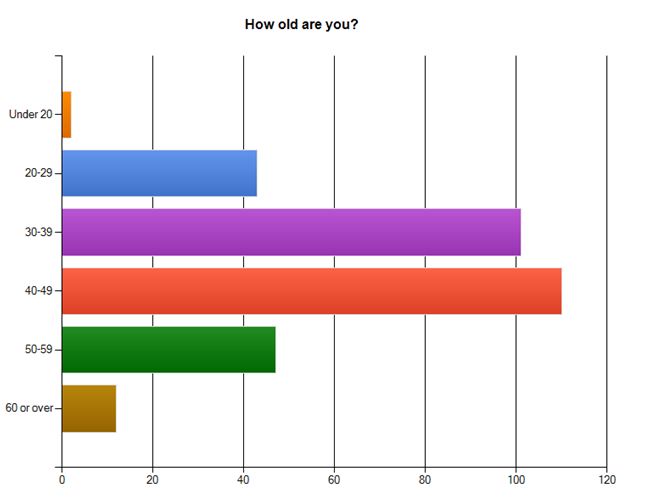
#blogchat, age, survey, twitter

As you can see from the above graph, the 40-49 age group was most common with 34.9%, 30-39 had 32.1%.

52.1% of respondents do blog for their employer.  I was actually surprised that this number was that high, I figured it would be around 25-33%.  Of the respondents that did blog for their employer, 86% do so for an employer with 500 employees or less.  In other words, if you follow #Blogchat and blog for your employer, you likely work for a small business.

As for types of blogging businesses represented in #Blogchat, 61.3% are B2B, 29.4% are B2C.

54.3% of y’all said you prefer to watch and learn versus participate in #blogchat.  This was probably the most interesting result of the entire survey for me, because it gives me my first real sense of the total size of the #blogchat community.  If that percentage holds every week, that means that #blogchat usually averages around 1,000-1,200 active followers/participants per week.

With this question, I was trying to figure out if most of #blogchat were ‘newbie’ bloggers, or more experienced.  65.6% of y’all said you’ve been blogging for at least 2 years.  And 31.6% have been blogging for 4 years or longer.  I was really surprised by that last number, and both suggest that #blogchat is full of experienced and knowledgeable bloggers.  Which is another reason why the chat is so valuable 😉 BTW, 92.1% of y’all said you do have your own blog, even if you also blog for your employer.

Finally, 27% of the #Blogchat community has bought a product or service based on the recommendation of someone in #Blogchat.  That’s a very high percentage, and it again speaks to the sense of community and trust present in #Blogchat!

So again, thank y’all SO much for taking this survey.  I tried to make it as quick and painless as possible, and many of you said it was.

Share this:

  • Share on X (Opens in new window) X
  • Share on Facebook (Opens in new window) Facebook
  • Share on LinkedIn (Opens in new window) LinkedIn
  • Email a link to a friend (Opens in new window) Email
  • Share on Reddit (Opens in new window) Reddit

Like this:

Like Loading...

Filed Under: #Blogchat, Blogging, Twitter

January 25, 2012 by Mack Collier

Social Media is About Building Relationships

Social media, networking, relationships

I spend a LOT of time on Twitter.  For me, Twitter is an amazing tool to connect and network with other people.  I know a lot of you like to use Facebook and Plus for the same reasons.

Often, we will hear that we shouldn’t be ‘wasting time’ on social media sites all day, and that we should be busy ‘getting things done’.  What these people don’t understand is that being successful in using Social Media is all about building human relationships.

As I said in my previous post, last week I got to visit Bazaarvoice and present Think Like a Rockstar to approximately 75 of their employees.  Additionally, this was the first time I’d presented Rockstar to a company, so I was excited about that as well.  But I think it’s interesting to consider how I got to the point where I could call Bazaarvoice a client.  You say it actually has taken 5 years.

In 2007, I wrote a Company Blog Checkup for Dell’s Direct2Dell blog.  I gave it pretty high marks, and in the comments, both Richard Binhammer, and John Pope (who was with Dell at the time) from Dell jumped in and offered feedback, and proved that they were listening.  Those comments by Dell got a relationship started with the company, and 3 years later, I was moderating the first #DellCAP event for the company!

The event lasted two days, and on the second day, Dell’s CMO joined us in the morning, who at the time was Erin Nelson, who would later accept the same position at Bazaarvoice!  So that’s the connection, right?  Well last week when I arrived at Bazaarvoice, Erin was telling her assistant about following me on Twitter and she said she loved my tweets because I was always tweeting about college football and giving her updates on games!  So it’s not my insights into brand advocacy that Erin wanted, but the score of the Texas – Oklahoma game in the 3rd quarter 😉

But that makes a wonderful point: Social Media is about CONNECTING with people and ESTABLISHING RELATIONSHIPS.  It doesn’t matter how that is done, for example with the college football tweets, Erin is literally one of dozens of people that have told me over the last couple of years that the love my tweets about college football.  Others have told me they love to watch BURN NOTICE or that they also love Dr Pepper 😉

All of those conversations might seem like a waste of time to some people, but they are leading to real business for me, and I bet they have for many of you as well.  And no, it doesn’t always happen overnight, and it often doesn’t happen when you try to ‘force’ it.  It usually happens when you try to connect with other people and share with them what you have learned, and try to learn from and get to know them as well.  Because Social Media is About Building Relationships.

Just like most areas of life, right?

Share this:

  • Share on X (Opens in new window) X
  • Share on Facebook (Opens in new window) Facebook
  • Share on LinkedIn (Opens in new window) LinkedIn
  • Email a link to a friend (Opens in new window) Email
  • Share on Reddit (Opens in new window) Reddit

Like this:

Like Loading...

Filed Under: Facebook, Google+, Social Networking, Twitter

January 3, 2012 by Mack Collier

How Much Does Social Media Cost Companies in 2012?

Social Media Marketing, Social Media Consulting, Social Media Marketing Fees, Twitter, Facebook, Blog, Google Plus, YouTube, Pinterest

Two years ago I wrote a post entitled So How Much Will a Social Media Strategy Cost, which was designed to give businesses and organizations an idea of how much they should expect to pay consultants and agencies for basic social media marketing services.  As you might expect, that post was insanely popular, so I followed it up with How Much Does Social Media Cost Companies in 2011 last year, and now this year those prices are being updated again with this post.  For all three, these prices are taken from published rates found online, as well as what other agencies and consultants have told me they charge for these services.

In general, both posts in 2010 and 2011 were designed to give companies basic price information around the most common services, such as setup and execution of a blog, Twitter and Facebook page, as well as basic Social Media Training.  In the comments of both posts, many of you mentioned that there were additional areas that you would like to see addressed in the future.

With that in mind, I reached out specifically to some friends and fellow consultants that offer Social Media Marketing services to their clients either as independents, or as part of an agency (their own, or someone else’s).  I would like to thank the following experts for helping me by giving me their rates for these services so I could have the most accurate price information(And on short-notice during the Holidays!):

Jason Falls, Tom Martin, Jay Baer, Tamar Weinberg, Nick Westergaard, Mitch Canter, Lisa Petrilli, David Griner, Drew McLellan, Bobby Rettew, DJ Waldow, Jennifer Kane and Kary Delaria.  If you have any questions about these services or need to hire a consultant or agency to help you with your Social Media Marketing efforts, please email me and I will be happy to work with you, or refer you to one or more of these fine people.  Also, please click their names to visit their blog/site and learn more about their services.

Before I get to the prices, I wanted to talk a bit about how the area of Social Media Consulting has changed over the last few years.  In 2008 and 2009, Social Media Consultants were in fairly high demand, especially the more well-known and established ones.  Companies were realizing that they needed to start using Social Media as a way to listen to and connect with their customers, yet they had little to no idea how to do so. Enter the Social Media Consultant.  A shift in marketing philosophy by many companies created a real demand for professionals that could create and execute social media strategies for companies.

By 2010 and 2011, most companies began to understand that Social Media wasn’t simply a fad, and it was a business necessity that they needed to address via hiring.  Many companies, especially larger brands, hired Social Media Managers, and then entire Social Media Marketing teams.  This shift had a profound impact on the area of Social Media Consulting in two ways:

1 – Many of these companies hired existing Social Media Consultants to be their Social Media Managers and fill their Social Media Marketing teams.  Companies like Radian 6 and Edelman PR aggressively hired independent consultants as well as professionals at other agencies to build and compliment their own Social Media Marketing teams.

2 – Many of these companies stopped (or slowed in) hiring Social Media Consultants for execution work, instead giving that to their in-house team.  The successful consultants and agencies today are usually the ones that adapted the quickest to this change.

As a result, the average Social Media Consultant today is doing less execution work, and is spending more time actually consulting with and training companies on how to use Social Media properly.  Diversification is a good thing.

Now, on with the prices.  As with last year’s post, for every service I am providing a range, as well as a Most Charge distinction.  In general, the fees associated with setup of basic social media tools like a company blog, Twitter or Facebook page have gone down.  On the other hand, rates for comprehensive Social Media Strategy auditing, creation and training services have generally increased.

In general, smaller businesses and non-profits can expect to pay prices that are closer to the low end of the price range, while large companies and organizations will probably see their quoted rates closer to the top end of the range.

Also, when looking at rates for monthly content curation and management of individual social media tools, remember that the more content the consultant/agency has to curate and create/edit for you, the higher the rates.  Likewise, if you can handle the content creation and just need training and some light editing, then your rates will usually be lower.

Here’s the prices:

Blog

Custom design and template creation – $1,000 – $5,000

Most Charge – $1,000-$3,000 

Writing/Editing Content for the blog plus ongoing training – $500-$4,000 a month (Assume 1-2 posts a week at this rate)

Most Charge – $1,000-$3,000

Ghostwriting blog posts – $50-$500 per

Most Charge – $75-$200 per


Twitter

Account Setup – $500-$2,000

Most Charge – $500-$1,000 

Ongoing Account Management and Training – $500-$3,000 a month (For this service, the more content you need provided for you, the higher the fees)

Most Charge – $500-$1,500 a month


Facebook

Initial Page Setup – $500-$2,500

Most Charge – $500-$1,500

Monthly Content Management and Curation – $500-$3,000 a month 

Most Charge – $1,000-$2,000 a month

Facebook Promotion Creation

Short-Term (1-3 months) Contest, including branding for the app, limited promotion on other channels such as Facebook and Twitter to promote the contest.  Fee doesn’t include prize and Facebook Ads to promote – $1,500-$20,000

Long-Term (3-6 months) Contest, including above, more elaborate promotion based on client’s needs – $25,000-$75,000

Note: These are the ‘Big Three’ tools when it comes to Social Media for business, and many consultants and agencies will offer companies a package deal on setting up and maintaining all three.  For other tools such as Google Plus, Pinterest, MySpace (yes many entertainment and music-related businesses especially still use it) and others, assume that rates in general will be consistent for what you could expect to pay for similar services with Facebook or Twitter.


Video

Total to shoot, produce and edit video – $500 – $30,000 (Note:  Obviously, the complexity and length of the video plays a huge role in the final cost.  If you want custom animation, several scenes and a 30-minute video, obviously that’s going to cost far more than a simple, 2-minute one-on-one video.  One expert told me that they charge $1,000 per minute of finished product.)


Social Media Strategy 

Social Media Monitoring (Note – Number of keywords/phrases tracked here has a big impact on fees.  More costs more.):

Setup – $500-$5,000

Most Charge – $1,000-$2,000

Ongoing Reports and Advisement – $500-$7,500 a month

Most Charge – $1,000-$2,000

Social Media Strategy Audit (Examine existing Social Media Strategy and give detailed recommendations on what strategy should look like moving forward, with instructions on how to measure results) – $2,000-$25,000

Most Charge – $5,000-$10,000

Social Media Strategy Creation and Integration with Existing Marketing Efforts (Note – Most consultants and agencies will require that this service be married to a Social Media Strategy Audit, as they will then create the strategy recommended in the audit) – $10,000-$30,000

Most Charge – $10,000-$15,000


Social Media Training and Consulting

Hourly Training/Consulting – $50-$500 an hour

Most Charge – $100-$250 an hour

Note: These rates are for 1 hour of work.  If you can commit to a certain number of hours a month, for example, consultants and agencies will almost always give you a discount.

Social Media Workshops(All fees exclude travel and are for ON-SITE Workshops, not online):

Half-Day (Up to 4 hours): $500-$7,500

Most Charge – $2,000-$3,500

Full-Day (6-8 hours): $1,000-$15,000

Most Charge – $4,000-$6,000

Note: Keep in mind that these rates represent a significant amount of training and content creation time.  So if you pay a consultant $5,000 for a day-long workshop, that consultant might have spent 20 or 30 hours creating that workshop.  So the prep time has to be considered in addition to the actual time delivering the workshop when looking at fees.


Rates to Hire a Social Media Speaker

Individual session (Up to 90 minutes, usually 1 hour): $1,000-$5,000

Most Charge: $2,000-$3,000

Keynote: $1,000-$15,000

Most Charge: $5,000-$10,000

All rates exclude travel.

Finally, I wanted to close with some advice on choosing a Social Media Consultant.  First, before you begin the process of hiring a Social Media Consultant, you need to address a few areas:

  • Figure out what you want to accomplish via Social Media.  Do you want to generate sales?  Increase brand awareness?  Establish thought leadership for your CEO or company?  Connect with donors?  Giving some thought to what you want to accomplish via your social media efforts will make the rest of the process smoother.
  • What are your human resources?  How many people can work on your social media efforts?  If you have a team of 10 at the ready, then the amount of assistance you will need is far less than if you are the only person for your company that will be handling your social media efforts.  Know how many people can work on your social media efforts and how much time they can devote, because if you plan on executing a Social Media Strategy that will require a team of 5, and you only have 2, that shortcoming will have to be addressed either through hiring, or outsourcing to the agency/consultant.  Either way, it costs you money.
  • How long is your project going to be?  You probably can’t pin this down exactly without talking to the consultant first, but it helps to give some thought to this.

When you contact a consultant or agency, they should be asking you questions as well.  They should want to know why you want to use social media, what are you trying to accomplish.  If they try to give you prices or push you toward using a particular tool without asking you questions, that is a red flag.  They really can’t give you prices until they know more about your company, your resources, and what you are wanting to accomplish.  Even if you contact them and tell them you need prices on creating and launching a blog, they should still ask you some questions to determine if you do need a blog to reach your intended business goals for your social media strategy.

As always, I hope this helps you in creating your Social Media budgets for 2012.  If you have any questions, please feel free to leave a comment.

Share this:

  • Share on X (Opens in new window) X
  • Share on Facebook (Opens in new window) Facebook
  • Share on LinkedIn (Opens in new window) LinkedIn
  • Email a link to a friend (Opens in new window) Email
  • Share on Reddit (Opens in new window) Reddit

Like this:

Like Loading...

Filed Under: Facebook, Google+, Mobile Marketing, Search Engine Optimization, Social Media, Social Media Monitoring, Social Networking, Twitter

December 13, 2011 by Mack Collier

Chat With NFL Legend Marcus Allen Wednesday Night on Twitter!

Marcus Allen, Twitter chat, NFL, Verizon, NFL Mobile AppIt really is fascinating the connections that are possible because of Twitter.  The site is a wonderful networking tool and I saw evidence of this earlier this morning when I got a DM from @TheOnlineMom.  I know Monica from her participation in #Blogchat, and she wanted to know if I wanted to help her with a project she’s working on involving a Twitter chat!  The chat will happen tomorrow night, and is an event by Verizon and the NFL, and it features NFL legend Marcus Allen!  As anyone that’s followed football in the last 30 years knows, Marcus is one of the most dominant football players of the modern era, he’s done everything from win the Heisman in college to being named league and Super Bowl MVP in the NFL.

So when Monica asked me if I’d like to be involved in helping to promote and participate in this chat, my answer was of COURSE I would 😉

Here’s all the details:

  • The chat happens tomorrow night, starting at 8pm Central, 9pm Eastern, 6pm Pacific.  Marcus Allen (@MarcusAllenHOF) will be the special guest, and will be answering your questions and chatting about his career.
  • The hashtag to follow for the chat is #NFLMobileApp.  If you’re familiar with #Blogchat, it’s the same deal, just follow the hashtag #NFLMobileApp.  Also, please follow Marcus at @MarcusAllenHOF and @TheTechDad will be hosting the chat!
  • As a special bonus, there will be TWO DROID RAZR smart phones by Motorola given away during the chat.  But you MUST RSVP at this link to be eligible to win one of the phones – http://bit.ly/tMWDSv  That will take you to Verizon’s site, and check in the top right corner for simple instructions on how to RSVP for one of the two phones!

That’s it!  So check out the chat tomorrow night, I’ll be participating, and I think it will be a lot of fun, especially if you are a college or NFL fan!  You could ask Marcus about his career, or I’m sure he’d love to talk about what’s happening now in the NFL or with his USC Trojans!

Now if you’re working with a company that’s curious about using Twitter chats, I also think you should at least attend this chat and observe how it goes.  This will give you a good idea of how a ‘one-off’ Twitter chat could be structured.  I’ve seen a big jump in interest from companies in starting Twitter chats in the last 6 months or so, and this would be a great chance for many of you to learn what the process is like, and see the results!

Disclosure – I’m being paid to promote and participate in this chat.  You’ll see me tweeting about it a few times today and tomorrow on Twitter, then I’ll be participating in the chat tomorrow night. 

Share this:

  • Share on X (Opens in new window) X
  • Share on Facebook (Opens in new window) Facebook
  • Share on LinkedIn (Opens in new window) LinkedIn
  • Email a link to a friend (Opens in new window) Email
  • Share on Reddit (Opens in new window) Reddit

Like this:

Like Loading...

Filed Under: Twitter

December 12, 2011 by Mack Collier

Why Social Media Measurement Fails Most Companies

Social media measurement, ROI of Social Media, Measuring Social MediaBecause they measure what’s available, instead of what benefits their company.

For example, let’s say your small business launches a Twitter account this afternoon.  How will you measure the success of that account?  By measuring number of followers, of course!  And if you want to get really spiffy, you could also track how many RTs you’re getting and your level of exposure!

Right?  The problem with this approach is that we aren’t factoring in your businesses strategy and goals for using Twitter.  What are you trying to accomplish?  How will getting more followers and RTs help you achieve your goals?

When I measure the effectiveness of my own Twitter efforts, I look at two metrics:

1 – Referral traffic from Twitter to this blog

2 – Leads generated via people I have connected with on Twitter.

That’s it.  Because my strategy is to use Twitter to increase my awareness among potential clients by sharing content that drives traffic back to this blog (referral traffic), and to engage in conversations and network with people so that they will hire me to consult/train for them (leads).

I was having a conversation recently with a new client about using Twitter, and they told me they were going to track the number of followers as their primary metric for success.  They even had plotted out X% growth that they wanted to see happen over time.  I told them it was fine to track number of followers, but follower growth needed to be a function of them achieving what should be their larger goals for Twitter.  This particular client wanted to use Twitter as a way to boost awareness for themselves, and the products they offer.  They were competing against 2 main competitors that had much higher levels of awareness.

So I suggested to them that we focus on using Twitter as a way to drive interest back to your blog and website.  So we went from tracking just followers, to also looking at things like:

1 – Referral traffic from Twitter to the blog (and as part of the metrics associated with the blog, look at referral traffic from the blog to the website).

2 – Level of engagement on the blog.

3 – Number of links generated to the blog.

4 – Sales leads generated via Twitter.

5 – Downloads of white papers via a link shared on Twitter (also share same link on the blog and compare/contrast download rates)

Now sometimes, it can be hard to know for sure that a new lead or link was generated via a contact on Twitter (or another social site).  That’s why it pays to ALREADY be tracking these metrics, then when you make a change (like adding a Twitter account), if one of the metrics you are already tracking suddenly increases, it’s a good bet that what you changed (adding a Twitter account) made the difference.

For example, let’s say that you launch a Twitter account, and in the 1st month you notice that hits to one specific product page on your website increased by 23%!  To try to figure out why, you check your website’s analytics, and discover that most of the hits were generated by a referral from one blog post written about that particular product, that included a link to the product page.  You do a bit more digging, and discover that most of the referral traffic for that one post, came from Twitter.

Now you at least have some idea of how Twitter is making an impact on your business.  You should further check into this and try to determine exactly why that particular post did well (The topic?  The writer?  The structure of the post?), and also try to figure out why it was so popular on Twitter (In what context was the link shared? What day?  What time?  More than once?).

The bottom line is that effective social media measurement is all about figuring out exactly what YOUR goals are, then measuring metrics that tie back to those goals.  We’ve all heard the saying ‘what gets measured gets manufactured’, and it couldn’t be more true when it comes to social media measurement.  If all you want to measure is number of followers to decide if your Twitter efforts are working, then you WILL find a way to increase your number of followers.

Remember: Strategy first, then identify metrics to measure based on desired outcomes, not what’s easiest to measure.

PS: Have an existing social media strategy and you want to have it audited to make sure you are on the right track? I can do that, and I guarantee my work.

Share this:

  • Share on X (Opens in new window) X
  • Share on Facebook (Opens in new window) Facebook
  • Share on LinkedIn (Opens in new window) LinkedIn
  • Email a link to a friend (Opens in new window) Email
  • Share on Reddit (Opens in new window) Reddit

Like this:

Like Loading...

Filed Under: Social Media 101, Social Media Monitoring, Twitter

December 9, 2011 by Mack Collier

#Blogchat This Sunday Will Be Co-Hosted by Valeria Maltoni!

Valeria Maltoni, Conversation Agent, Posting more often, Blogging as a Subject Matter Expert

I am thrilled to announce that Valeria Maltoni (@ConversationAge on Twitter) will be co-hosting #Blogchat this Sunday!  Valeria is one of the most respected blogging marketers on the planet for one simple reason: She creates incredibly valuable content on a daily basis.  Let me tell you a quick story about Valeria: Earlier this year during SXSW, I was at the Hilton’s bar with Valeria, Ann Handley and Leigh Durst at around 11pm, on a Saturday night.  It’s been a long day, we are all exhausted cause we’ve been on the go since about 6am that morning.  As we are sleepishly chatting, Valeria whips out her Macbook, and after a few minutes I ask her what she’s doing.  She says ‘I’m doing some research for a blog post that I need to get up on my blog for tomorrow morning.”

And there you go.  As I blogged about yesterday, for the 1st half of 2011 I blogged up to 5 times a week.  It was a TON of work, and Valeria blogs more often than that, every week.  I wanted Valeria to co-host with us not only to teach us how she can keep up such a prolific posting schedule, but to also talk about how her blog has helped establish her as an expert.  This is really an area that so many of us want to learn how we can do with our blog.  I’ve noticed in the last year especially that Valeria is one of the people that other marketers in this space are always talking about as one of the truly ‘smart’ people.  She does a wonderful job of creating amazing content on a daily basis on her blog, which really helps her establish herself as an expert.

So first, check out the prep post Valeria has written over at her blog covering what her #Blogchat topic is.

Now here’s the breakdown of our conversation with Valeria this Sunday:

8:00-8:30 PM Central – Valeria will talk to us about the prep work that goes into her posts.  The research she does, how she comes up with post ideas, etc.

8:30-9:00 PM Central – Valeria will talk to us about how she uses her blog to establish herself as a Subject Matter Expert.  This will be equally applicable to those of you that are independent or small business owners, as well as marketers that are looking to stand out within their company and industry.

I’m REALLY excited to have Valeria join us, and I’m sure you are as well!  Please make sure you are subscribed to her blog, Conversation Agent, and please follow her on Twitter!

BTW if you are new to #Blogchat, here’s what it’s all about.  Also, I’m excited to announce that next Sunday (the 18th) will be co-hosted by #Blogchat regular Bruce Sallan, talking about how blogging and social media can be used for social good!  And already confirmed to co-host in early 2012 are @MarketingProfs, @GenoChurch and @Pistachio!

See y’all on Sunday!

Share this:

  • Share on X (Opens in new window) X
  • Share on Facebook (Opens in new window) Facebook
  • Share on LinkedIn (Opens in new window) LinkedIn
  • Email a link to a friend (Opens in new window) Email
  • Share on Reddit (Opens in new window) Reddit

Like this:

Like Loading...

Filed Under: #Blogchat, Blogging, Twitter

December 7, 2011 by Mack Collier

How to Increase Participation in Your Twitter Chat or Any Online Community

Interaction and participation.  It’s something many community sites and managers struggle with and focus on increasing.  Engagement is the lifeblood of many online communities, and yet, so many struggle to reach that ‘critical mass’ of participants.

When #Blogchat started in early 2009, participation wasn’t an issue.  Even in those 1st few weeks where we’d only have a few hundred tweets, there was plenty of engagement.  But even then, I noticed some problems.  It seemed that there were a core group of really smart bloggers that were, for the most part, answering the questions of everyone else.  So the core group of smart bloggers were mainly talking to each other, and fielding questions from everyone else.

If you think about it, you see this in a lot of online communities, especially knowledge-based ones.  You have the ‘newbies’ and the ‘experts’.  And early on, that’s what we saw with #Blogchat, the ‘newbies’ were asking questions of the ‘experts’.  And there’s nothing wrong with that, but the problem is this: If you’re not a ‘newbie’ or an ‘expert’, how do you participate?

What started happening is that I would talk to people that follow #Blogchat, and when they told me they lurked, I would invite them to participate.  “#Blogchat is so much better when more people participate so we can all learn from each other!” I would tell them.  Almost every time, they would reply by saying “Oh no! I don’t have anything to add, I’m not an expert!”

I hated hearing that.  So I added a new rule for everyone in #Blogchat: No experts allowed.

That’s not to say that smart people can’t and shouldn’t participate, but I wanted to communicate to everyone that they should feel comfortable participating.  #Blogchat works best when everyone is comfortable sharing what they know.  Does that mean that some people make some points that are completely off the wall?  Yep, but that also leads to new discussions, because others feel comfortable questioning and debating those claims.

But if your community only has interaction from the experts and newbies, you’re going to be ignoring everyone else.  Kathy had a great point about this several years ago, and her point is the same as mine, that you need to communicate to your community that everyone should participate, and help them feel comfortable doing so.  For #Blogchat, when they hear ‘No experts allowed, we are all here to learn from each other’, it puts everyone at ease.  Most people are smarter than they give themselves credit for, they might not believe they are ‘qualified’ to join a discussion, but they almost always have something they can share that can benefit the group.

One of your key roles as a community manager is to get everyone to a place where they are comfortable contributing as they can.  And remember that when people start participating in a community, they begin to take a sense of ownership in that community.  That greatly increases the motivation they have to help you grow that community, and make it more valuable for everyone.

This starts by finding ways to get everyone more interactive.  Not just newbies asking experts questions, but everyone asking and answering questions.  This will generate more discussions and more value for everyone.

If you want to get more discussions and participation among your community, consider these steps:

1 – Encourage involvement from lurkers.  As I am watching #Blogchat’s stream, it’s obviously moving way too fast for me to catch even a fraction of the tweets.  But if I see anyone tweet that they are joining #Blogchat for the 1st time, I *always* go back and thank them for joining.  Nothing makes a lurker feel more welcome than announcing to the group that they are joining for the 1st time, and immediately getting a thank you tweet from the moderator.  Additionally, other #Blogchat members have started doing the same thing, which only increases the chance that this lurker will move to being a participant.

2 – Understand that statements are NOT discussions.  Often, I will notice that a member of #Blogchat isn’t directly engaging with anyone, but rather they are tweeting out general statements like ‘Blog from the heart!’ or ‘Make your post as long or as short as it needs to be!’  These tweets will probably get a lot of RTs, but by themselves, they don’t often generate a lot of discussion.  If I see someone that’s constantly leaving tweets like this, I try to engage them.  I’ll ask them questions about their statements, and hopefully get a discussion started with them.  Then, others have an opportunity to join in.

3 – Encourage all members to be helpful.  When I first started #Blogchat, I asked regular contributors to please help me by welcoming new participants, and to help them with any questions they have.  The #Blogchat regulars do a wonderful job of being helpful to everyone.  Now I tell everyone that if they are new to #Blogchat, to feel free to ask any of us any questions, that we will be happy to help.  And I am constantly seeing others tweet about how helpful and friendly the #Blogchat community is, so I think the #Blogchat regulars view it as a badge of honor.  At least I hope they do, because I do 😉

4 – Clearly spell out for all members how they can participate and what is expected of them.  All it takes is a simple post listing out the purpose of your community and any guidelines.  This is important, because if someone stumbles upon an established community, it can be a very daunting thing, and a ‘road map’ can definitely help put them at ease.

5 – If you are active in your community (as you should be), then make sure you are following your own rules.  For example, when I participate in #Blogchat, I am usually asking questions of other participants.  I try to avoid always making statements, and I use the words ‘I think….’ a lot.  If I am asking questions as the ‘moderator’ of #Blogchat then it sets the tone of everyone else to the same.


Remember at the end of the day if you can reach a point where community members are creating value for themselves, then everyone wins.  A great way to do this is to increase the level of participation within that community.

Share this:

  • Share on X (Opens in new window) X
  • Share on Facebook (Opens in new window) Facebook
  • Share on LinkedIn (Opens in new window) LinkedIn
  • Email a link to a friend (Opens in new window) Email
  • Share on Reddit (Opens in new window) Reddit

Like this:

Like Loading...

Filed Under: #Blogchat, Community Building, Social Networking, Twitter, Uncategorized

November 7, 2011 by Mack Collier

Review: LIVE #Blogchat at Blog World Expo in Los Angeles

You know how a parent isn’t supposed to show favoritism toward one child?  I almost feel that way about the seven Live #Blogchats that have been so far this year.  Every one had amazing discussions and was special in its own way.

But Live #Blogchat at Blog World Expo was my favorite one so far.  By far.

This was the 1st Live #Blogchat where there were several regular and active #Blogchat participants in attendance.  At all the other Live #Blogchats, at best there were a handful that had joined a few times, maybe a couple of regular participants.  But for many, they had little to no idea what a ‘#blogchat’ was.  This group not only knew what it was, but they knew the people that were going to be there.  Many of them showed up 30 minutes early to the session just to meet each other and I lost track of how many times I heard someone scream OMG! and then immediately tacklehug someone!  This was the first Live #Blogchat where I really felt like the community was present.  When the first wave showed up, we all were so excited to see each other that we spent about 5 minutes posing for pictures 😉

This is what I really wanted to see happy at the Live events because #Blogchat belongs to its community.  Yes, I started #Blogchat almost 3 years ago, but there are hundreds of people that have taken an active role in building #blogchat into what it is today.  I cannot wait to see what the Live #Blogchats look like a year from now when everyone is familiar with the format, and the audience is mostly made up of regulars, like it was at Blog World.

We didn't have no stinkin' speakers in Live #blogchat, so the Live-Bloggers got to be on the stage 😉

Thanks to Judy for the above pic!  Now I wanted to explain how this room was structured.  When I got to the room about an hour before Live #Blogchat started, you had a room with 90ish chairs, all facing forward.  The 1st two rows were at tables, facing the stage along with the rest of the chairs.  I wanted the chairs all facing toward the middle, so we switched the 1st two rows of chairs at the tables that you see in this pic, so they were facing the back of the room.  Then as a few people started arriving, James asked ‘So who’s going to be on stage?’  Without thinking, I said ‘You are!’   And all the live-bloggers for the session got to be up on stage.  I *really* thought it was important to have active #blogchat members up on the stage because if the ‘spotlight’ was going to be on anyone in this session, it should be on them.

The discussion, as always, was excellent.  We started off talking about creating a blogging strategy, but as always happens in #blogchat on Twitter, we soon started veering off into other areas like finding a focus for your blog, your content, injecting personal tones and personality to your blog to give it a unique voice; your own.  James did a great job of collecting many of the key tweeted takeaways from the Live #Blogchat via Storify.  I did want to send out a special thank you to Tamsen McMahon, Jason Falls, Marcy Massura and Mark Horvath for making a special effort to answer questions from fellow #blogchat participants.  I honestly think I talked way too much during #blogchat, and I had several participants afterward mention how much they appreciated their help.

And thanks to James for this picture, I don’t like most of my pictures, but this was a good one.  Clearly, being around #Blogchat peeps brings out the best in me 😉

I would hope that most of you had as much fun at the Live #Blogchat at Blog World as I did, but I know you didn’t 😉  Many of you have been asking about the next Live #Blogchat, it is tentatively scheduled for South By Southwest in March.  Right now I am trying to get sponsors and the venue locked down, so if you know a company that might be a good fit for a Live #Blogchat sponsorship, please email me and I’ll be happy to give them a rundown on what’s included, prices, etc.

When #Blogchat started, I told everyone that I appreciated them for coming, and loved them for it.  I meant every single word of that.  As we were getting set up, I went to check my phone to see how much time I had left before we got started, and I realized I was smiling from ear to ear.  I was so damn happy to see everyone and so glad they could share in this experience!  As soon as I thanked everyone for coming at the end of our hour, everyone got up and instead of leaving, all stayed and chatted and I realized how incredible LOUD it suddenly got in the room because everyone was either talking really loud because they were excited to be meeting someone, or because they were laughing at something someone had just said.

I loved it.  And I love all of you that came and made it possible!

Share this:

  • Share on X (Opens in new window) X
  • Share on Facebook (Opens in new window) Facebook
  • Share on LinkedIn (Opens in new window) LinkedIn
  • Email a link to a friend (Opens in new window) Email
  • Share on Reddit (Opens in new window) Reddit

Like this:

Like Loading...

Filed Under: #Blogchat, Community Building, Twitter

October 29, 2011 by Mack Collier

#Blogchat this Sunday will be Co-Hosted by Lee Odden discussing Live-Blogging an event!

I’m thrilled to announce that this Sunday night (October the 30th), #Blogchat will be co-hosted by Lee Odden!  I wanted to Lee to co-host our final #Blogchat before Blog World Expo because one of Lee’s many talents is that he is a prolific live-blogger!  So for those of you that are heading to Blog World that were considering Live-Blogging some of the sessions, I thought this would be perfect prep for you!

As always, #Blogchat will start at 8pm Central, on Sunday night.  Here’s what we’ll be discussing:

From 8:00pm-8:30pm – What are the Top 2-3 things you should know before you attempt to live-blog an event?

From 8:30pm-9:00pm – What are the advantages to live-blogging an event versus simply doing a recap post once you get home?

So if you have any questions about live-blogging, definitely check out #Blogchat and Lee can help you out!  Thanks again to Lee for agreeing to join us, and please make sure you subscribe to Top Rank Blog and follow Lee on Twitter!

BTW if you are new to #Blogchat, here’s what it’s all about.  And if you will be attending Blog World, please join us for a LIVE #Blogchat on Saturday, November the 5th!

Share this:

  • Share on X (Opens in new window) X
  • Share on Facebook (Opens in new window) Facebook
  • Share on LinkedIn (Opens in new window) LinkedIn
  • Email a link to a friend (Opens in new window) Email
  • Share on Reddit (Opens in new window) Reddit

Like this:

Like Loading...

Filed Under: #Blogchat, Twitter

October 27, 2011 by Mack Collier

Is your company making this mistake when it comes to Social Media?

Apple recently launched the newest version of the iPhone, the 4S.  Anticipation was so strong for this launch that it’s being blamed for the 1st ever dip in smartphone sales last quarter, with the thinking being that buyers were holding off on getting a new smartphone till they saw what the new iPhone provided.  Apple said it was its most successful iPhone launch to date.  Also, Sprint now offers the popular smartphone, along with Verizon and AT&T.

But there was one feature of the new iPhone 4S that caught my eye: Twitter is integrated with the phone’s operating system.  That means Twitter is on the phone, and you can more easily tweet from the phone, if you take a picture you can quickly send it straight to Twitter, etc.  It’s also led to an understandable spike in Twitter signups.

And then there’s this: Twitter users are five times more likely to share content on mobile devices versus Facebook users.  And this study was conducted before the introduction of the iPhone 4S.

It’s not about understanding Social Media, it’s about understanding how and why your customers are using social media.

So as a business, if your customers are on Twitter, it’s definitely important for you to understand how to use Twitter.  But it’s even more important for you to understand how your customers are using Twitter.  For example, here’s some questions you could ask:

  • Do our customers prefer to use Twitter when they are on the go (smartphones) or do they prefer to use Twitter at home (iPads and laptops)?
  • The study mentions that Twitter users share more, what type of content are they sharing?  Tweets?  Pictures?  Both?
  • How are our customers using Twitter?  For networking?  Keeping up with friends?  Sharing and finding out the latest breaking news?
  • Does the way our customers use Twitter change when they are on their smartphone versus their laptop or iPad?

It’s very important to understand social media, but it’s far more important to understand your customers.

Share this:

  • Share on X (Opens in new window) X
  • Share on Facebook (Opens in new window) Facebook
  • Share on LinkedIn (Opens in new window) LinkedIn
  • Email a link to a friend (Opens in new window) Email
  • Share on Reddit (Opens in new window) Reddit

Like this:

Like Loading...

Filed Under: Mobile Marketing, Social Networking, Twitter, Uncategorized

  • « Previous Page
  • 1
  • …
  • 9
  • 10
  • 11
  • 12
  • 13
  • …
  • 26
  • Next Page »

Recent Posts

  • My Substack Conversion Rate Went From 0.5% to 13% in Six Months, Here’s How
  • A Solid Conversion Strategy is Vital on Substack, Here’s the Proof
  • Empathy is Your Customer Service Secret Weapon
  • Understanding Substack’s Three Growth Stages
  • Blogging Isn’t Dead, it’s Morphed Into Substack

Categories

Archives

Comment Policy

Be nice, be considerate, be friendly. Any comment that I feel doesn't meet these simple rules can and probably will be deleted.

Top Posts & Pages

  • The Real Reason Why the Mona Lisa is So Popular Will Surprise You
  • Let's Take a Closer Look at Patagonia's Worn Wear Road Tour
  • Why Did Jesus Send His Apostles Out With Nothing?
  • Understanding Substack's Three Growth Stages
  • Case Study: Patagonia’s Brand Ambassador Program Focuses on Product Design and Development Over Sales
  • The Difference Between a Brand Ambassador and a Brand 'Spokesperson'
  • #Blogchat LIVE is coming to Content Marketing World!
  • How Much Does a Brand Ambassador Program Cost?
  • Case Study: Why GE Started an Employee Brand Ambassador Program to Solve One Specific Business Problem
  • Why introverts love Social Media

  • Blog
  • Mack’s Bio
  • Work With Mack
  • Buy Think Like a Rock Star
  • Book Mack to Speak

Copyright © 2026 · Executive Pro Theme on Genesis Framework · WordPress · Log in

%d